- 1. In case of technical questions
- 2. Server access
- 3. Authentication
- 4. Endpoint for most-recent API versions
- 5. Errors and Exceptions
- 6. Mediation, Transformation and Orchestration
- 7. Document types
- 8. Classes
- 9. Operations/Endpoints
- 10. Clients
- 11. Tutorials
- 12. Interactive testing using Postman/Bruno
- 13. Performance Tests with Jmeter
- 14. Terms of service
- 15. Troubleshooting
- 16. Inhouse variant
- 17. Sentry
- 18. Version history
- Index
- Glossar
Kapitel 1. In case of technical questions
Please contact
Jochen Stärk
or
Martin Wachtveitl
The status (e.g. upcoming maintenances) of the server is available on it’s status page.
Kapitel 2. Server access
User access to the web interface is possible via https://api.usegroup.de/. Terms of service are listed in the chapter Terms of service.
To register please access the Mustangserver signup page
select a desired username, enter your email and click the "send" button on the bottom left.
You will receive a mail with a activation link you have to access to activate your free 4 week evaluation period. If you do not react on reminder emails your accont will expire after your evaluation.
Afterwards you can login on https://api.usegroup.de/devportal/ .
You will need it your username in order to log in and in case you want to reset your password, both are not possible using your email address. In case you forgot your username feel free to inquire at info@mustangproject.org using the email address you are requesting the username for. This username does not have anything to do with optional username parameters mentioned below.
After being logged in you need to register your interest, i.e. „subscribe“ to the APIs you require.
If you select the desired Mustangserver version and click on the blue "try out" button (not the link in the navigation) on the next page you should be able to click a "get test key" button.
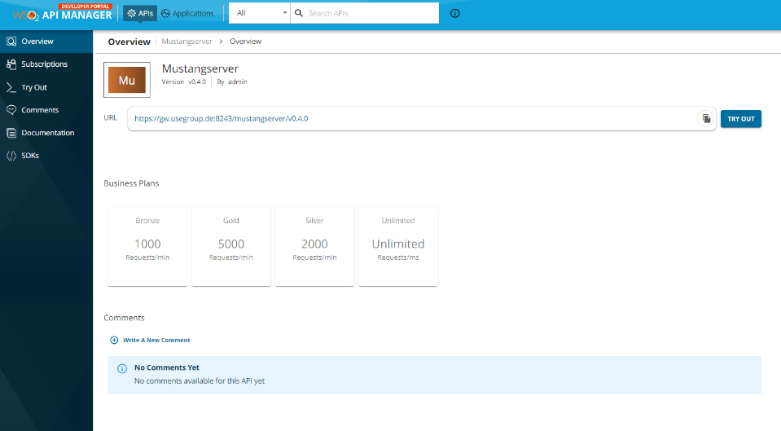
e.g. when you open the "ping" operation and click "try it out" and "execute" you should get a "pong" response.
You can always change your password on https://api.usegroup.de/devportal/settings/change-password/
There is a optional „username“ field for all operations: Please ignore it. It serves as a placeholder where the API management transmits your username, if it were set by any application the value would be overwritten anyway.
Kapitel 3. Authentication
3.1. OAuth2
First of all you will have to subscribe to the API. You can manage your subscriptions in the left navigation of the devportal but it’s often easiest to subscribe via overview|try out, which also allows you to try it.
Then you will have to enable client credentials in the applications tab, https://api.usegroup.de:9443/devportal/applications Default Application, Oauth2 tokens. The procedure is described more detailled in the PHP tutorial but is generic to all examples and does not apply for PHP only.
Please note that most clients will use the Mustangserver version which had been selected in the backend when downloading the OpenAPI definition. Feel free to replace /mustang/<version>/mustang by as described in Endpoint for most-recent API versions.
3.2. Api Key
In the applications tab, select Default Application, Oauth2 tokens, Production Keys, API Key. Select according restrictions if required, click Generate Key, select lifetime and click generate. Copy&safely store the generated key.
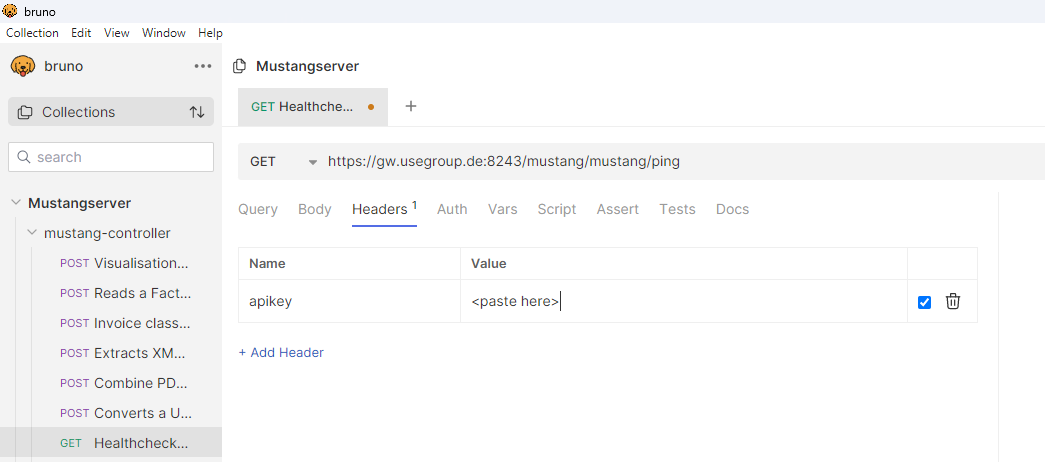
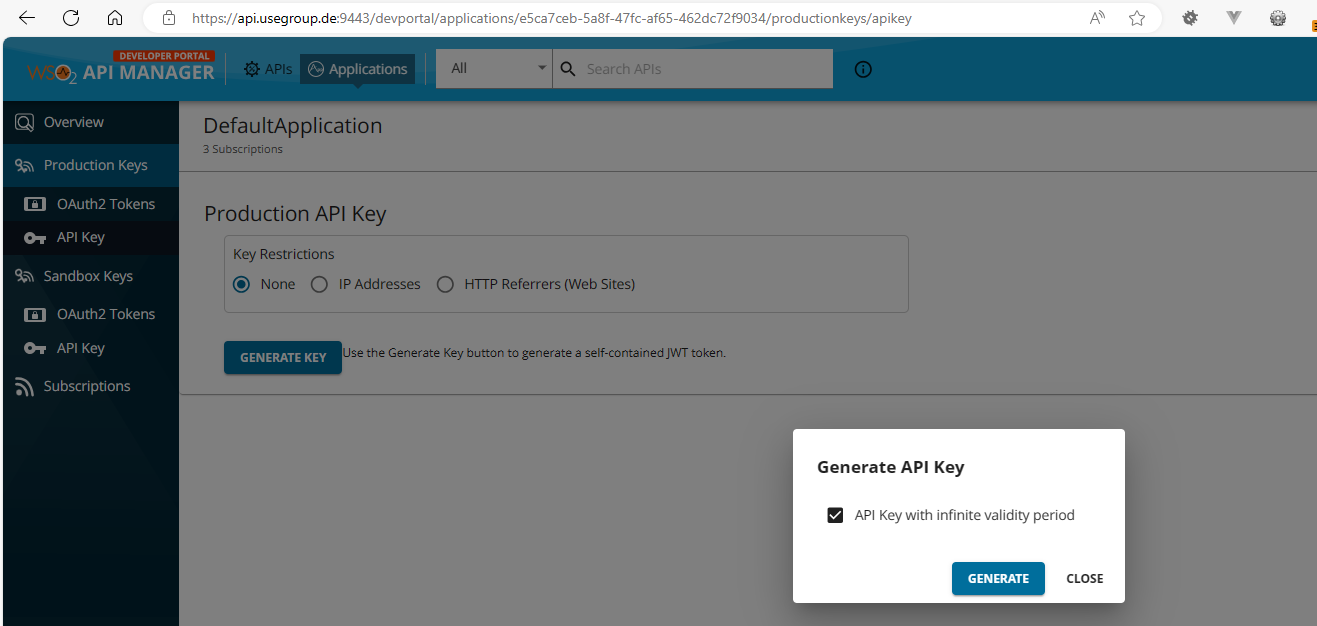 API key can be used e.g. within Bruno.
Within PHP you also might pass just as additional header attribute making your source code look like
<?php
require_once(__DIR__ . '/vendor/autoload.php');
$apikey="<your key>";
$config = Swagger\Client\Configuration::getDefaultConfiguration();
$gc=new GuzzleHttp\Client(['headers' => ['apikey' => $apikey]]);
$apiInstance = new Swagger\Client\Api\MustangControllerApi($gc,$config);
try {
$result = $apiInstance->ping();
print_r($result);
} catch (Exception $e) {
http_response_code(500);
echo 'Exception when calling ErrorControllerApi->handle: ',
$e->getMessage(), PHP_EOL;
}
Kapitel 4. Endpoint for most-recent API versions
If you leave out the version number in the request to the gateway you will always be using the latest recommended (usually the latest) version. In that case e.g. your „ping“ endpoint changes from https://gw.usegroup.de:8243/mustang/1.0.0/mustang/ping to https://gw.usegroup.de:8243/mustang/mustang/ping .
New versions may be retired as soon as six month after release of the
successor. It is possible to always use the latest (more precisely:
recommended) version by removing the version from the endpoint. This is
an example of the validate endpoint:

Please note that a API key encodes the subscriptions at the time of the creation of the key, and that a newer version will require a new subscription (to that version), i.e. you should not use the most recent version in conjuntion with API keys because you will require new API keys for new versions.
Kapitel 5. Errors and Exceptions
In case of an exception Mustangserver will return a http status code of 400 and the message of the Exception will be returned in the „message“ field of the according JSON.
{
  "requestUrl": "http://127.0.0.1:8000/mustang/combineXML",
  "httpCode": 400,
  "errorCode": "MSE1000:Unbekannte Fehler während der Request
Ausführung!",
  "message": "File is not a valid PDF/A-1 input file"

}
Kapitel 6. Mediation, Transformation and Orchestration
The http://api.usegroup.de/ uses WSO² as API management which in turn uses Apache Synapse (https://synapse.apache.org/) for mediation/transformation/orchestration. This means that mediation and orchestration can be developed e.g. in WSO²‘s Integration Studio (https://wso2.com/integration/integration-studio/) and uploaded as XML file. Apart from acting as a load balancer and central authentication this allow to
-
override certain states in the process, e.g. implement a timeout after a certain number of seconds
-
invoke a chain of operations in only one virtual endpoint, e.g. conversion from plain PDF, parallely converting invoice data to XML, merging PDF/A and XML and validation thereof and/or
-
map any custom specific input- or output parameter to the values used by Mustangserver internally
Kapitel 7. Document types
7.1. Invoice
The invoice has a „documentCode“ attribute of 380.
7.2. Cancellation
A cancellation has a „documentCode“ attribute of 381.
7.3. Corrected Invoice
A corrected invoice has a „documentCode“ attribute of 384. Please note that amounts are usually negative, so this is a minimal example for a corrected invoice:
{
"documentCode": "384",
"number": "471102",
"currency": "EUR",
"issueDate": "2018-03-04T00:00:00.000+01:00",
"dueDate": "2018-03-04T00:00:00.000+01:00",
"deliveryDate": "2018-03-04T00:00:00.000+01:00",
"sender": {
"name": "Lieferant GmbH",
"zip": "80333",
"street": "Lieferantenstraße 20",
"location": "München",
"country": "DE",
"taxID": "201/113/40209",
"vatID": "DE123456789",
"globalID": "4000001123452",
"globalIDScheme": "0088"
},
"recipient": {
"name": "Kunden AG Mitte",
"zip": "69876",
"street": "Kundenstraße 15",
"location": "Frankfurt",
"country": "DE"
},
"zfitems": [
{
"price": 9.9,
"quantity": -20,
"product": {
"unit": "H87",
"name": "Trennblätter A4",
"description": "",
"vatpercent": 19,
"taxCategoryCode": "S"
}
},
{
"price": 5.5,
"quantity": -50,
"product": {
"unit": "H87",
"name": "Joghurt Banane",
"description": "",
"vatpercent": 7,
"taxCategoryCode": "S"
}
}
]
}
7.4. Credit Note
A credit note has a „documentCode“ attribute of 389.
Kapitel 8. Classes
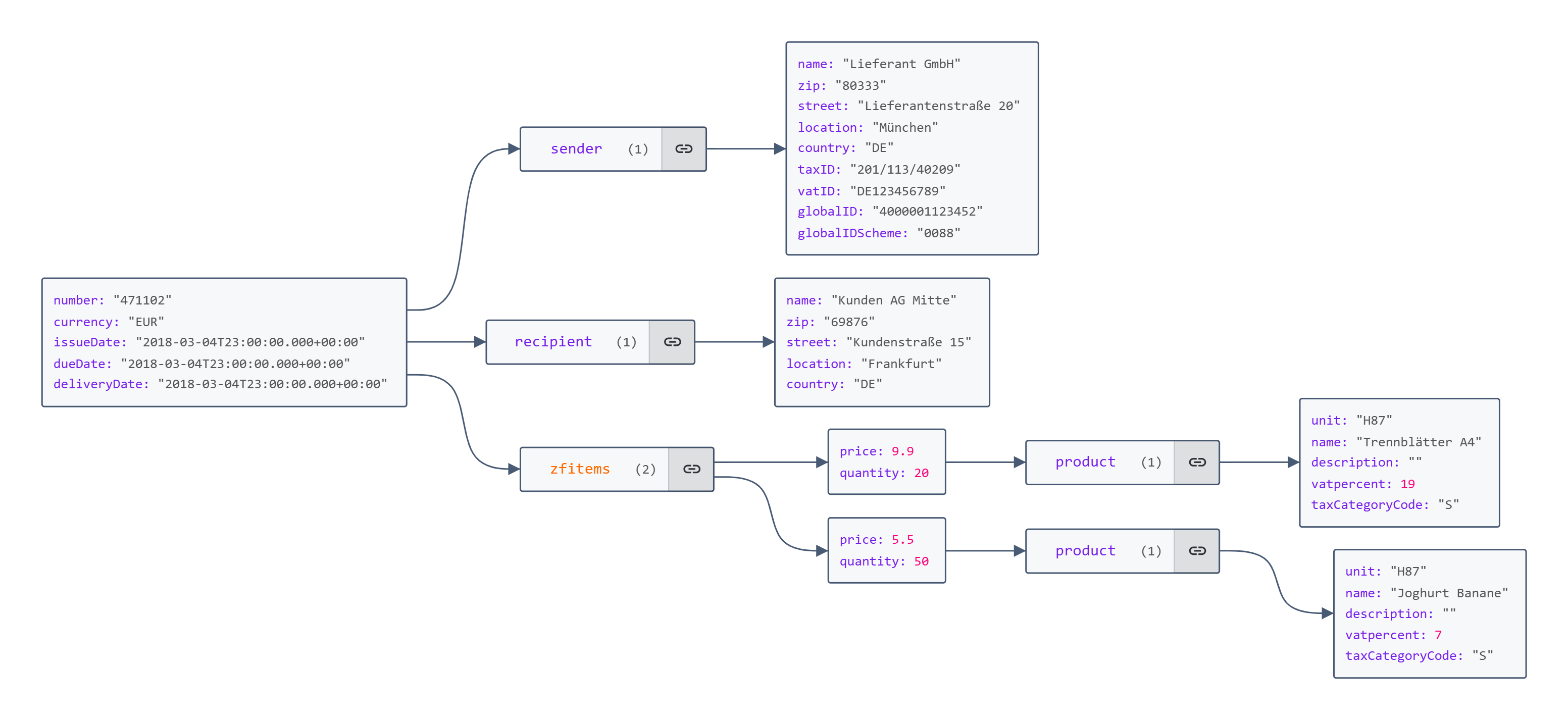
Mustangserver has two important main classes, invoice and calculatedInvoice. Invoice contains tradeparty classes for recipients and senders and item classes which in turn contain instances of product classes.
The difference between invoice and calculatedInvoice is that the latter contains (redundant, because calculatable) properties like grandTotal. These attributes are provide for courtesy when reading invoices but are not required when wrinting. However, if they are present when writing (e.g. combine or invoice2XML) they will raise an error if the invoice calculation does not match. This can be useful when a PDF file has been generated with another process and the Factur-X-XML is supposed to have the same values, in which case the PDF values can be provided because an error would be more helpful than a silently incorrect Factur-X file because the PDF has been calculated incorrectly, or uses features not yet available in Mustangserver.
8.1. Invoice class
The invoice class is used for all document types.
8.1.1. Invoice
Minimal example
{
"number": "471102",
"currency": "EUR",
"issueDate": "2018-03-04T00:00:00.000+01:00",
"dueDate": "2018-03-04T00:00:00.000+01:00",
"deliveryDate": "2018-03-04T00:00:00.000+01:00",
"sender": {
"name": "Lieferant GmbH",
"zip": "80333",
"street": "Lieferantenstraße 20",
"location": "München",
"country": "DE",
"taxID": "201/113/40209",
"vatID": "DE123456789",
"globalID": "4000001123452",
"globalIDScheme": "0088"
},
"recipient": {
"name": "Kunden AG Mitte",
"zip": "69876",
"street": "Kundenstraße 15",
"location": "Frankfurt",
"country": "DE"
},
"zfitems": [
{
"price": 9.9,
"quantity": 20,
"product": {
"unit": "H87",
"name": "Trennblätter A4",
"description": "",
"vatpercent": 19,
"taxCategoryCode": "S"
}
},
{
"price": 5.5,
"quantity": 50,
"product": {
"unit": "H87",
"name": "Joghurt Banane",
"description": "",
"vatpercent": 7,
"taxCategoryCode": "S"
}
}
]
}
Comprehensive example
{
  "documentCode": "380",
  "number": "Test_EeISI_100",
  "referenceNumber": "123",
  "buyerOrderReferencedDocumentID": "abc",
  "currency": "EUR",
  "paymentTermDescription": "total amount",
  "issueDate": "2018-11-11T23:00:00.000+00:00",
  "dueDate": "2018-11-29T23:00:00.000+00:00",
  "deliveryDate": "2018-12-03T23:00:00.000+00:00",
  "sender": {
    "name": "Seller name",
    "zip": "12345",
    "street": "Seller address line 1",
    "location": "Seller city",
    "country": "DE",
    "taxID": "DE49294093",
    "vatID": "DE12345677",
    "description": "Seller additional legal information",
    "additionalAddress": "Seller address line 2",
    "additionalAddressExtension": "Seller address line 3",
    "debitDetails": [
      {
        "mandate": "Mandate reference identifier",
        "paymentMeansCode": "4",
        "paymentMeansInformation": "SEPA",
        "iban": "IT1212341234123412"
      }
    ],
    "contact": {
      "name": "Seller contact point",
      "phone": "+41 345 654455",
      "email": "seller@contact.de"
    },
    "vatid": "DE12345677",
    "legalOrganisation": {
      "tradingBusinessName": "Seller trading name"
    },
    "globalID": "Seller identifier 2",
    "globalIDScheme": "0110",
    "email": "Seller electronic address"
  },
  "recipient": {
    "name": "Buyer name",
    "zip": "34562",
    "street": "Buyer address line 1",
    "location": "Buyer city",
    "country": "IE",
    "vatID": "IE394838894",
    "additionalAddress": "Buyer address line 2",
    "additionalAddressExtension": "Buyer address line 3",
    "bankDetails": [
      {
        "accountName": "Payment account name",
        "paymentMeansCode": "58",
        "paymentMeansInformation": "SEPA credit transfer",
        "iban": "IT1212341234123412"
      }
    ],
    "contact": {
      "name": "Buyer contact point",
      "phone": "+353 2948584",
      "email": "buyer@contact.ie"
    },
    "vatid": "IE394838894",
    "legalOrganisation": {
      "tradingBusinessName": "Buyer trading name"
    },
    "globalID": "Buyer identifier",
    "globalIDScheme": "0190",
    "email": "Buyer electronic address"
  },
  "deliveryAddress": {
    "name": "Deliver to party name",
    "zip": "98765",
    "street": "Deliver to address line 1",
    "location": "Deliver to city",
    "country": "IE",
    "additionalAddress": "Deliver to address line 2",
    "additionalAddressExtension": "Deliver to address line 3",
    "globalID": "deliver location identifier",
    "globalIDScheme": "0045"
  },
  "payee": {
    "name": "Payee name",
    "legalOrganisation": {},
    "globalID": "Payee identifier",
    "globalIDScheme": "0098"
  },
  "sellerOrderReferencedDocumentID": "def",
  "totalPrepaidAmount": 0,
  "invoiceReferencedDocumentID": "abc123",
  "despatchAdviceReferencedDocumentID": "lmn",
  "creditorReferenceID": "Bank assigned creditor identifier",
  "roundingAmount": 0,
  "paymentReference": "Remittance information",
  "lineTotalAmount": 200,
  "duePayable": 205,
  "grandTotal": 205,
  "taxBasis": 200,
  "valid": true,
  "additionalReferencedDocuments": [
    {
      "filename": "filename0",
      "mimetype": "application/pdf",
      "relation": "Data",
      "description": "Additional file attachment",
      "data": "ZGVmYXVsdA=="
    }
  ],
  "ownTaxID": "DE49294093",
  "ownVATID": "DE12345677",
  "notesWithSubjectCode": [
    {
      "content": "invoice note text"
    },
    {
      "content": "invoice note text 2"
    }
  ],
  "detailedDeliveryPeriodFrom": "2018-11-11T23:00:00.000+00:00",
  "detailedDeliveryPeriodTo": "2018-11-29T23:00:00.000+00:00",
  "zfallowances": [
    {
      "totalAmount": 10,
      "basisAmount": 100,
      "taxPercent": 5,
      "reason": "Doc allowance reason text",
      "reasonCode": "95",
      "categoryCode": "S"
    }
  ],
  "zfcharges": [
    {
      "totalAmount": 10,
      "basisAmount": 100,
      "taxPercent": 5,
      "reason": "Doc charge reason text",
      "reasonCode": "AAA",
      "categoryCode": "S"
    }
  ],
  "zfitems": [
    {
      "price": 10,
      "quantity": 10,
      "basisQuantity": 1,
      "detailedDeliveryPeriodFrom": "2018-11-11T23:00:00.000+00:00",
      "detailedDeliveryPeriodTo": "2018-11-29T23:00:00.000+00:00",
      "id": "1a",
      "buyerOrderReferencedDocumentLineID": "12345",
      "product": {
        "unit": "EA",
        "name": "Item name",
        "sellerAssignedID": "Item seller's identifier",
        "buyerAssignedID": "Item buyer's identifier",
        "description": "Item description",
        "taxCategoryCode": "S",
        "attributes": {
          "Size": "L",
          "Color": "Red"
        },
        "classifications": [
          {
            "classCode": {
              "listID": "ZZZ",
              "code": "Item classification identifier0",
              "listVersionID": "version0"
            }
          }
        ],
        "vatpercent": 5,
        "globalID": "Item standar identifier\n        ",
        "globalIDScheme": "0060",
        "intraCommunitySupply": false,
        "reverseCharge": false
      },
      "accountingReference": "6789",
      "itemAllowances": [
        {
          "percent": 1,
          "totalAmount": 1,
          "basisAmount": 100,
          "taxPercent": 0,
          "reason": "Invoice line allowance reason",
          "categoryCode": "S"
        }
      ],
      "itemCharges": [
        {
          "percent": 1,
          "totalAmount": 1,
          "basisAmount": 100,
          "taxPercent": 0,
          "reason": "Invoice line charge reason",
          "categoryCode": "S"
        }
      ],
      "additionalReferences": [
        {
          "issuerAssignedID": "Line object identifier",
          "typeCode": "130"
        }
      ],
      "notesWithSubjectCode": [
        {
          "content": "Invoice line note"
        }
      ],
      "value": 10
    },
    {
      "price": 10,
      "quantity": 10,
      "basisQuantity": 1,
      "id": "1b",
      "product": {
        "unit": "EA",
        "name": "Item name 2",
        "taxCategoryCode": "Z",
        "vatpercent": 0,
        "intraCommunitySupply": false,
        "reverseCharge": false
      },
      "value": 10
    }
  ],
  "tradeSettlement": [
    {
      "mandate": "Mandate reference identifier",
      "paymentMeansCode": "4",
      "paymentMeansInformation": "SEPA",
      "iban": "IT1212341234123412"
    }
  ],
  "ownStreet": "Seller address line 1",
  "ownZIP": "12345",
  "ownLocation": "Seller city",
  "ownCountry": "DE"
}
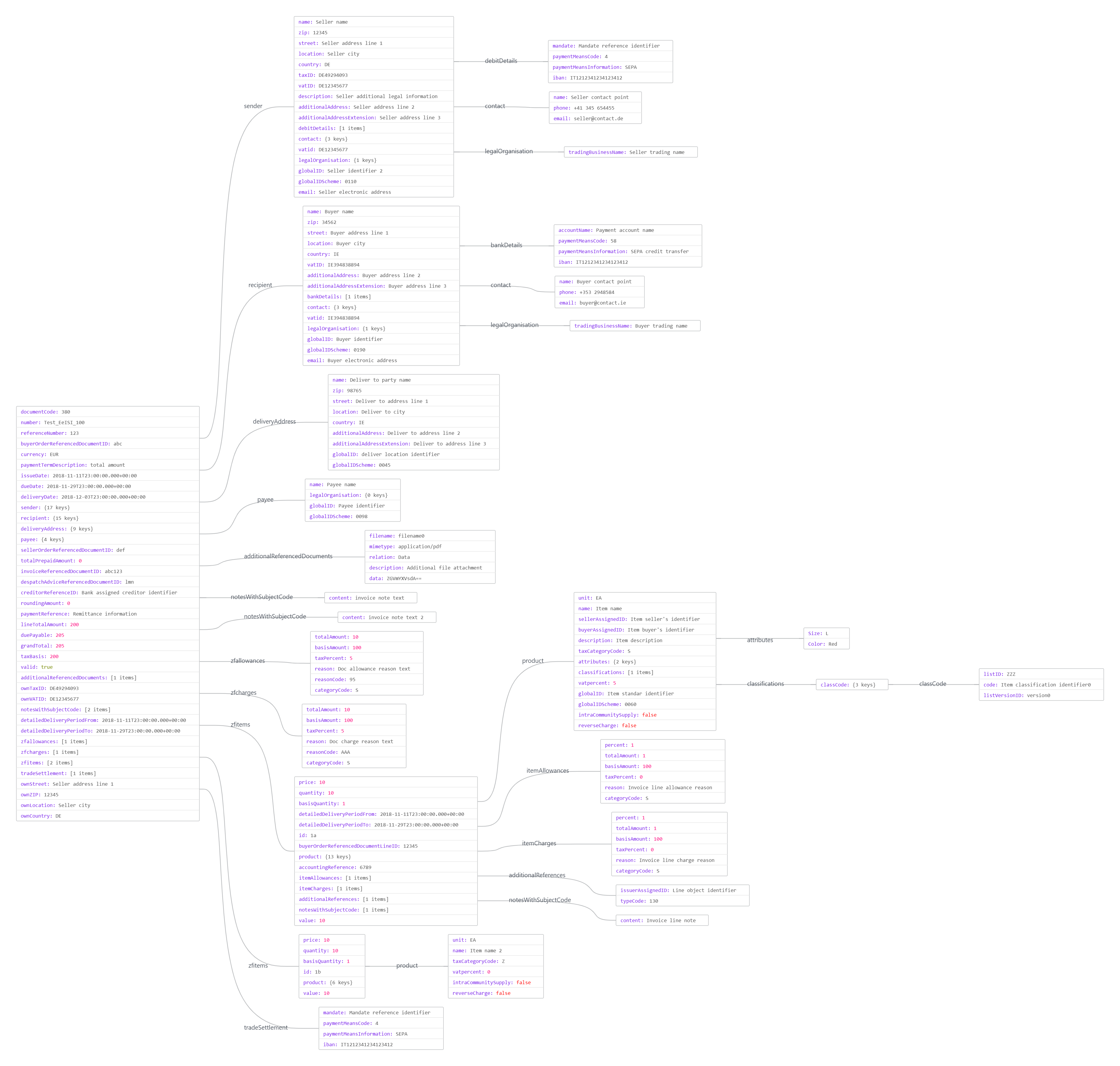
8.1.2. BT-IDs
The following BTs are mapped as follows:
| JSONPath | BT ID |
|---|---|
recipient |
|
recipient.name |
BT-44 |
recipient.id |
BT-46 |
recipient.vatid ( also memtioned as recipient.vatID) |
BT-48 |
recipient.street |
BT-50 |
recipient.additionalAddress |
BT-51 |
recipient.additionalAddressExtension |
BT-163 |
recipient.location |
BT-52 |
recipient.zip |
BT-53 |
recipient.country |
BT-55 |
recipient.globalID |
ID BT-46 |
recipient.globalIDScheme |
ID Scheme BT-46 |
recipient.contact.name |
BT-56 |
recipient.contact.phone |
BT-57 |
recipient.contact.email |
BT-58 |
recipient.legalOrganisation.tradingBusinessName |
BT-45 |
sender |
|
sender.name |
BT-27 |
sender.legalOrganisation.tradingBusinessName |
BT-28 |
sender.globalID |
BT-29 |
sender.globalIDScheme |
BT-29-ID |
sender.vatid ( also mentioned as sender.vatID) |
BT-31 |
sender.taxID |
BT-32 |
sender.street |
BT-35 |
sender.additionalAddress |
BT-36 |
sender.additionalAddressExtension |
BT-162 |
sender.zip |
BT-38 |
sender.location |
BT-37 |
sender.country |
BT-40 |
sender.contact.name |
BT-41 |
sender.contact.phone |
BT-42 |
sender.contact.email |
BT-43 |
Invoice |
|
number |
BT-1 |
documentCode |
BT-3 |
currency |
BT-5 |
buyerOrderReferencedDocumentID |
BT-13 |
sellerOrderReferencedDocumentID |
BT-14 |
despatchAdviceReferencedDocumentID |
BT-16 |
referenceNumber |
BT-10 |
Payment Details / Invoice Comment |
|
issueDate |
BT-9 |
tradeSettlement.iban |
BT-84 |
Price details – items |
|
zfitems.quantity |
BT-129 |
zfitems.product.unit |
BT-130 |
zfitems.price |
BT-146 |
zfitems.product.taxCategoryCode |
BT-151 |
zfitems.product.vatpercent |
BT-152 |
zfitems.buyerOrderReferencedDocumentLineID |
BT-132 |
zfitems.product.name |
BT-153 |
zfitems.product.sellerAssignedID |
BT-155 |
zfitems.product.globalID |
BT-157 |
zfitems.product.globalIDScheme |
BT-157-ID |
zfitems.additionalReferences.issuerAssignedID |
BT-128 |
8.1.3. Included Notes
Remarks on document level are passed in the Array notesWithSubjectCode, subjectCode is optional.
"notesWithSubjectCode": [

 [{
"content": "MUSTER-Autovermietung GMBH\nMusterstr. 99\n99199
MUSTERHAUSEN\nGeschäftsführung:\nMaxima Musterfrau\nUSt-IdNr:
DE136695976\nTelefon: +49 711-50885524\nwww.musterlieferant.de\nHRB Nr.
372876\nAmtsgericht Musterstadt\nGLN 4304171000002",
"subjectCode": "REG"
},

{
"content": "Bei Rückfragen:\nTelefon: +49 711-50885524\nE-Mail :
info@muster-autovermietung.de"
}]
The meaning of the Subject codes is as follows
AAI |
General information |
SUR |
Seller notes |
REG |
Regulatory information |
ABL |
Legal information |
TXD |
Tax information |
CUS |
Customs information |
ACY |
Introduction |
AAK |
Discount and bonus agreements |
ABZ |
Vehicle license number |
8.1.4. File attachments
File attachments are Base64-encoded in the attribute additionalReferencedDocuments. Example:
{
"additionalReferencedDocuments": [
{
"data": "b25ldHdvdGhyZWU=",
"description": "Additional file attachment",
"filename": "text.txt",
"mimetype": "text/plain",
"relation": "Data"
}
],
"number": "471102",
"currency": "EUR",
"issueDate": "2018-03-04T00:00:00.000+01:00",
"dueDate": "2018-03-04T00:00:00.000+01:00",
"deliveryDate": "2018-03-04T00:00:00.000+01:00",
"sender": {
"name": "Lieferant GmbH",
"zip": "80333",
"street": "Lieferantenstraße 20",
"location": "München",
"country": "DE",
"taxID": "201/113/40209",
"vatID": "DE123456789",
"globalID": "4000001123452",
"globalIDScheme": "0088"
},
"recipient": {
"name": "Kunden AG Mitte",
"zip": "69876",
"street": "Kundenstraße 15",
"location": "Frankfurt",
"country": "DE"
},
"zfitems": [
{
"price": 9.9,
"quantity": 20,
"product": {
"unit": "H87",
"name": "Trennblätter A4",
"description": "",
"vatpercent": 19,
"taxCategoryCode": "S"
}
},
{
"price": 5.5,
"quantity": 50,
"product": {
"unit": "H87",
"name": "Joghurt Banane",
"description": "",
"vatpercent": 7,
"taxCategoryCode": "S"
}
}
]
}
8.1.5. Cancellations, Corrected Invoices, Credit Memos
For cancellations use documentCode 381, for credit memos use 389. Corrected invoices have documentCode 384 and the quantity of the items to be corrected, which should no longer be billed to the customer, should be negative, resulting in a negative grand total.
8.1.6. Small businesses
Example for small business
{
"number": "471102",
"currency": "EUR",
"issueDate": "2018-03-04T00:00:00.000+01:00",
"dueDate": "2018-03-04T00:00:00.000+01:00",
"deliveryDate": "2018-03-04T00:00:00.000+01:00",
"sender": {
"name": "Lieferant GmbH",
"zip": "80333",
"street": "Lieferantenstraße 20",
"description": "Kleinunternehmer nach §119 UStG",
"location": "München",
"country": "DE",
"taxID": "201/113/40209",
"vatID": "DE123456789",
"globalID": "4000001123452",
"globalIDScheme": "0088"
},
"recipient": {
"name": "Kunden AG Mitte",
"zip": "69876",
"street": "Kundenstraße 15",
"location": "Frankfurt",
"country": "DE"
},
"zfitems": [
{
"price": 9.9,
"quantity": 20,
"product": {
"unit": "H87",
"name": "Trennblätter A4",
"description": "",
"vatpercent": 0,
"taxExemptionReason": "Small business, §119 UStG",
"taxCategoryCode": "E"
}
}
]
}
8.1.7. Example for intra community supply
{
"number": "471102",
"currency": "EUR",
"issueDate": "2018-03-04T00:00:00.000+01:00",
"dueDate": "2018-03-04T00:00:00.000+01:00",
"deliveryDate": "2018-03-04T00:00:00.000+01:00",
"sender": {
"name": "Lieferant GmbH",
"zip": "80333",
"street": "Lieferantenstraße 20",
"location": "München",
"country": "DE",
"taxID": "201/113/40209",
"vatID": "DE123456789",
"globalID": "4000001123452",
"globalIDScheme": "0088"
},
"recipient": {
"name": "Kunden AG Mitte",
"zip": "69876",
"street": "Kundenstraße 15",
"location": "Frankfurt",
"country": "DE"
},
"zfitems": [
{
"price": 9.9,
"quantity": 20,
"product": {
"unit": "H87",
"name": "Trennblätter A4",
"description": "",
"vatpercent": 0,
"taxExemptionReason": "intra-community supply",
"taxCategoryCode": "K"
}
}
]
}
8.1.8. Cash discounts
For cash discounts add an array (because there can be multiple rates, at multiple intervals) with days and percent to the invoice:
"cashDiscounts": [
{
"days": 14,
"percent": 2
}
]
8.1.9. Leitweg-ID
The german B2G ID can be set in the invoice root level as
"referenceNumber": "04011000-12345-34"
8.1.10. Item allowances/charges
In the item in zfitems there may be arrays itemAllowances or itemCharges. E.g. 10 cent allowance would be
{
"basisQuantity": 1,
"itemAllowances": [
{
"categoryCode": "S",
"totalAmount": 0.1
}
],
"price": 3.0,
...
},
and 50% charges are
{
"basisQuantity": 1,
"itemCharges": [
{
"categoryCode": "S",
"percent": 50,
"taxPercent": 0
}
]
Please note that this will only be interpreted when writing since XML parsing already adjusts the net price to already contain all allowances/charges.
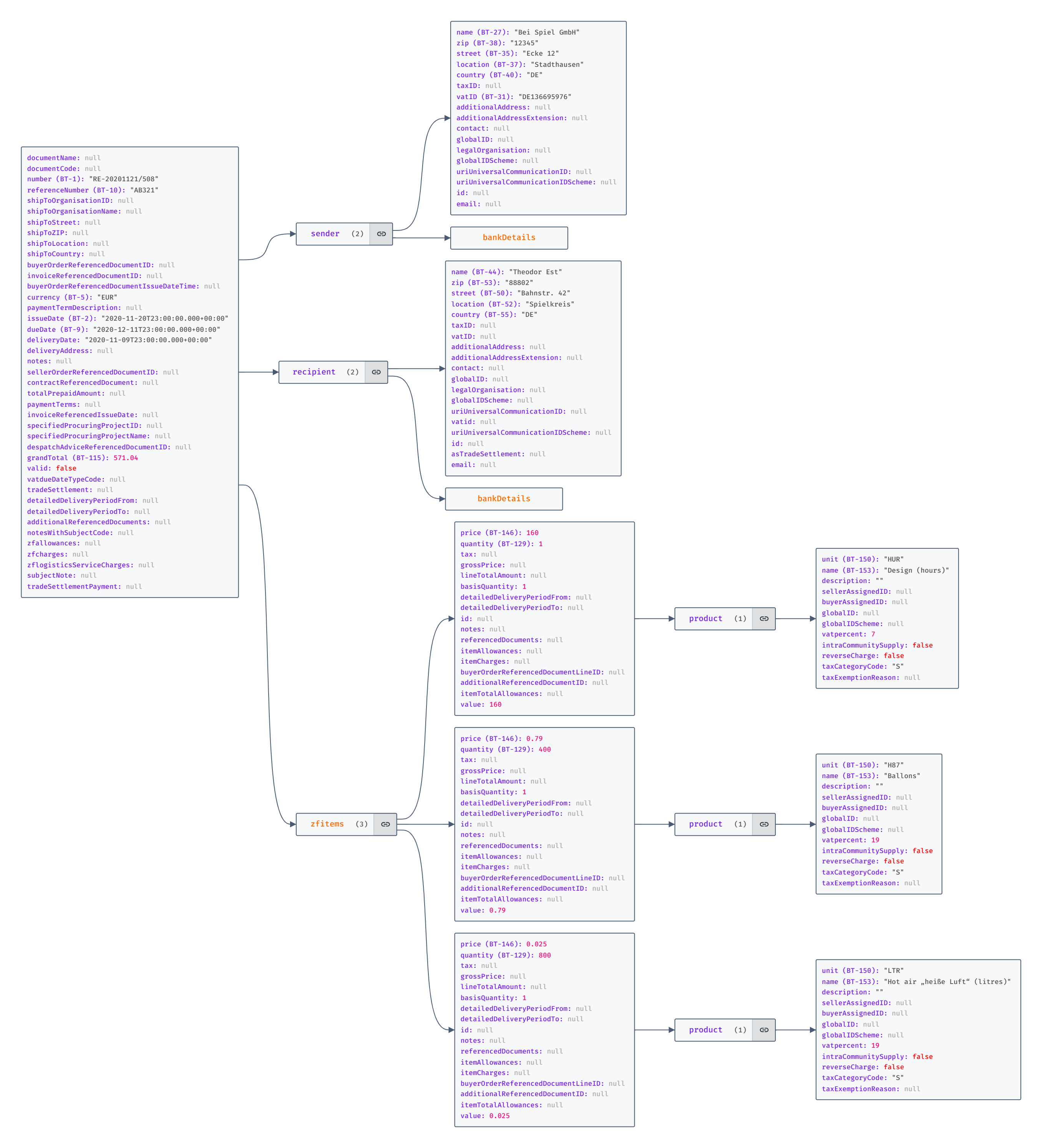
8.2. CalculatedInvoice
{ "documentName": null, "documentCode": "380", "number":
"RE-20201121/508", "ownOrganisationFullPlaintextInfo": null,
"referenceNumber": "AB321", "shipToOrganisationID": null,
"shipToOrganisationName": null, "shipToStreet": null, "shipToZIP": null,
"shipToLocation": null, "shipToCountry": null,
"buyerOrderReferencedDocumentID": null, "invoiceReferencedDocumentID":
null, "buyerOrderReferencedDocumentIssueDateTime": null,
"ownForeignOrganisationID": null, "ownOrganisationName": "Bei Spiel
GmbH", "currency": "EUR", "paymentTermDescription": null, "issueDate":
"2020-11-20T23:00:00.000+00:00", "dueDate":
"2020-12-11T23:00:00.000+00:00", "deliveryDate":
"2020-11-09T23:00:00.000+00:00", "sender": { "name": "Bei Spiel GmbH",
"zip": "12345", "street": "Ecke 12", "location": "Stadthausen",
"country": "DE", "taxID": null, "vatID": "DE136695976",
"additionalAddress": null, "additionalAddressExtension": null,
"bankDetails": [ { "accountName": null, "bic": null, "iban":
"DE88200800000970375700" } ], "contact": null, "legalOrganisation":
null, "uriUniversalCommunicationID": null,
"uriUniversalCommunicationIDScheme": null, "globalID": null,
"globalIDScheme": null, "vatid": "DE136695976", "id": null, "email":
null, "asTradeSettlement": [ { "accountName": null, "bic": null,
"iban": "DE88200800000970375700" } ] }, "recipient": { "name": "Theodor
Est", "zip": "88802", "street": "Bahnstr. 42", "location": "Spielkreis",
"country": "DE", "taxID": null, "vatID": null, "additionalAddress":
null, "additionalAddressExtension": null, "bankDetails": [], "contact":
null, "legalOrganisation": null, "uriUniversalCommunicationID": null,
"uriUniversalCommunicationIDScheme": null, "globalID": null,
"globalIDScheme": null, "vatid": null, "id": "2", "email": null,
"asTradeSettlement": null }, "deliveryAddress": null, "cashDiscounts":
[], "notes": null, "sellerOrderReferencedDocumentID": null,
"contractReferencedDocument": null, "totalPrepaidAmount": null,
"paymentTerms": null, "invoiceReferencedIssueDate": null,
"specifiedProcuringProjectID": null, "specifiedProcuringProjectName":
null, "despatchAdviceReferencedDocumentID": null, "creditorReferenceID":
null, "grandTotal": 571.04, "valid": false, "ownStreet": "Ecke 12",
"ownZIP": "12345", "zfallowances": null, "zfitems": [ { "price": 160,
"quantity": 1, "tax": null, "grossPrice": null, "lineTotalAmount": null,
"basisQuantity": 1, "detailedDeliveryPeriodFrom": null,
"detailedDeliveryPeriodTo": null, "id": null, "product": { "unit":
"HUR", "name": "Design (hours)", "sellerAssignedID": null,
"buyerAssignedID": null, "description": "", "countryOfOrigin": null,
"attributes": null, "intraCommunitySupply": false, "vatpercent": 7,
"globalID": null, "globalIDScheme": null, "reverseCharge": false,
"taxCategoryCode": "S", "taxExemptionReason": null }, "notes": null,
"referencedDocuments": null, "additionalReferences": null,
"buyerOrderReferencedDocumentLineID": null, "itemAllowances": null,
"itemCharges": null, "itemTotalAllowances": null,
"additionalReferencedDocumentID": null, "value": 160 }, { "price":
0.79, "quantity": 400, "tax": null, "grossPrice": null,
"lineTotalAmount": null, "basisQuantity": 1,
"detailedDeliveryPeriodFrom": null, "detailedDeliveryPeriodTo": null,
"id": null, "product": { "unit": "H87", "name": "Ballons",
"sellerAssignedID": null, "buyerAssignedID": null, "description": "",
"countryOfOrigin": null, "attributes": null, "intraCommunitySupply":
false, "vatpercent": 19, "globalID": null, "globalIDScheme": null,
"reverseCharge": false, "taxCategoryCode": "S", "taxExemptionReason":
null }, "notes": null, "referencedDocuments": null,
"additionalReferences": null, "buyerOrderReferencedDocumentLineID":
null, "itemAllowances": null, "itemCharges": null,
"itemTotalAllowances": null, "additionalReferencedDocumentID": null,
"value": 0.79 }, { "price": 0.025, "quantity": 800, "tax": null,
"grossPrice": null, "lineTotalAmount": null, "basisQuantity": 1,
"detailedDeliveryPeriodFrom": null, "detailedDeliveryPeriodTo": null,
"id": null, "product": { "unit": "LTR", "name": "Hot air „heiße Luft“
(litres)", "sellerAssignedID": null, "buyerAssignedID": null,
"description": "", "countryOfOrigin": null, "attributes": null,
"intraCommunitySupply": false, "vatpercent": 19, "globalID": null,
"globalIDScheme": null, "reverseCharge": false, "taxCategoryCode": "S",
"taxExemptionReason": null }, "notes": null, "referencedDocuments":
null, "additionalReferences": null,
"buyerOrderReferencedDocumentLineID": null, "itemAllowances": null,
"itemCharges": null, "itemTotalAllowances": null,
"additionalReferencedDocumentID": null, "value": 0.025 } ], "ownTaxID":
null, "tradeSettlement": [ { "accountName": null, "bic": null, "iban":
"DE88200800000970375700" } ], "ownVATID": "DE136695976", "ownLocation":
"Stadthausen", "ownCountry": "DE", "zfcharges": null,
"detailedDeliveryPeriodTo": null, "notesWithSubjectCode": null,
"detailedDeliveryPeriodFrom": null, "vatdueDateTypeCode": null,
"zflogisticsServiceCharges": null, "additionalReferencedDocuments":
null, "subjectNote": null, "tradeSettlementPayment": null }
Kapitel 9. Operations/Endpoints
9.1. /mustang
Mustangserver’s available operations are
9.1.1. Ping
Just a test, always just returns „pong“. The only operation acessible via HTTP GET, the rest is POST.
9.1.2. Validate
Validate a Factur-X/ZUGFeRD, XRechnung CII or UBL or Order-X/-CIO File using Mustang’s validator. Requires a file and returns a Mustang XML report. The format to be validated against will be read from it’s guideline ID.
(optional parameter: ignoreNotices, boolean, default false)
Warnings and errors will always be contained in the XML result, if ignoreNotices is set to true no notices will be present. Currently notices mention additional validation results, i.e. if you pass a EN16931 Factur-X file there may be notices which additional elements may be required to also get a valid XRechnung.
9.1.3. Phive
9.1.4. parse
 Read a Factur-X/ZUGFeRD/XRechnung and create a JSON representation.
Requires a Factur-X , Order-X or Xrechnung-file.
Will return a calculatedInvoice, i.e. a grandTotal will be available. If it is set when writing (invoice2XML and combineInvoice), it will be compared vis á vis the calculated items and an exception will be thrown if the values do not match. In particular when writing a Factur-X PDF this should be used to ensure the machine readable XML-values match the human readable PDF values.
The object will look as described for CalculatedInvoice example.
parse is the reverse operation to „invoice2XML“, i.e. if you have access to a XML sample you want to reproduce, running it through parse will give you JSON which should create a very similar XML if passed through invoice2XML.
9.1.5. Invoice2xml
Converts a Factur-X/ZUGFeRD/XRechnung JSON representation to XML.
Requires a input JSON string, a format (ZUGFeRD = zf, XRechnung = xr,
Factur-X = fx or Order-X=ox), a version (usually 2 for ZUGFeRD and 1 for
Factur-X) and a profile
("MINIMUM","BASICWL","BASIC","EN16931","EXTENDED" or "XRECHNUNG"
for Factur-X, for ZUGFeRD 1 "BASIC","COMFORT" or "EXTENDED"). For
XRechnung only "XRECHNUNG".
Please refer to the documentation of the Invoice class.
invoice2XML is the reverse operation to „parse“, i.e. if you have access to a XML sample you want to reproduce, running it through parse will give you JSON which should create
a very similar XML if passed through invoice2XML.
9.1.6. Extract
Extracts just the XML (not as JSON like parse) from a Factur-X/ZUGFeRD/Order-X file.
9.1.7. detach
Parameter: file
Extracts all file attachments from the PDF (including e.g. a factur-x.xml) and the XML, if the invoice has attachments, and returns a JSON structure with base64-encoded contents like this:
{
"pdf": [],
"xml":
[{"aFileA.png":"iVBORw0KGgoAAAANSUhEUgAAAAgAAAC1CAQAAADIUnarAAAABGdBTUEAALGPC/xhBQAAACBjSFJNAAB6JgAAgIQAAPoAAACA6AAAdTAAAOpgAAA6mAAAF3CculE8AAAAAmJLR0QA/4ePzL8AAAAJcEhZcwAACxMAAAsTAQCanBgAAAAHdElNRQfkAQIXGQ0qsHJfAAAAo0lEQVRIx+3MoQrCUBjF8f+9dzBtgha72eAYLJgMQ4tvMREfQuw+wGA2mxarxTeYgi9gEwyDNaOfYTrM5u+kw4/DcQAwi4PO+Q5gK2AsUVW+UEdBQUFBQUFBQUFB4W9IQhMRL3oABpKppLaLmEIm2cXMR6897c++cEM3WBPUBw2eVrzfR/Gtd6Cs4SFHl1/DFn18oDTLbOcgPwWFacpNVpstvAG3bSYVfhBdGAAAACV0RVh0ZGF0ZTpjcmVhdGUAMjAyMC0wMS0wMlQyMzoyNToxMyswMDowMEN9AywAAAAldEVYdGRhdGU6bW9kaWZ5ADIwMjAtMDEtMDJUMjM6MjU6MTMrMDA6MDAyILuQAAAAAElFTkSuQmCC"},\{"sameFileB.png":"iVBORw0KGgoAAAANSUhEUgAAAAgAAAC1CAQAAADIUnarAAAABGdBTUEAALGPC/xhBQAAACBjSFJNAAB6JgAAgIQAAPoAAACA6AAAdTAAAOpgAAA6mAAAF3CculE8AAAAAmJLR0QA/4ePzL8AAAAJcEhZcwAACxMAAAsTAQCanBgAAAAHdElNRQfkAQIXGQ0qsHJfAAAAo0lEQVRIx+3MoQrCUBjF8f+9dzBtgha72eAYLJgMQ4tvMREfQuw+wGA2mxarxTeYgi9gEwyDNaOfYTrM5u+kw4/DcQAwi4PO+Q5gK2AsUVW+UEdBQUFBQUFBQUFB4W9IQhMRL3oABpKppLaLmEIm2cXMR6897c++cEM3WBPUBw2eVrzfR/Gtd6Cs4SFHl1/DFn18oDTLbOcgPwWFacpNVpstvAG3bSYVfhBdGAAAACV0RVh0ZGF0ZTpjcmVhdGUAMjAyMC0wMS0wMlQyMzoyNToxMyswMDowMEN9AywAAAAldEVYdGRhdGU6bW9kaWZ5ADIwMjAtMDEtMDJUMjM6MjU6MTMrMDA6MDAyILuQAAAAAElFTkSuQmCC"}]
}
The input file can be a PDF/A-3, or a XML. Please note a PDF/A-3 may have both pdf and xml attachments at the same time (embedded within the xml which is embedded in the PDF).
9.1.8. combine
Combines a JSON encoded invoice object (as described for „parse“) and a PDF/A document to a Factur-X/ZUGFeRD PDF/A-3 document. Requires a input PDF/A-1 or A-3 file, a format (ZUGFeRD = zf, Factur-X = fx or Order-X = ox), a version (usually 2 for ZUGFeRD and 1 for Factur-X) and a profile ("MINIMUM","BASICWL","BASIC","EN16931","EXTENDED" or "XRECHNUNG" for Factur-X, for ZUGFeRD 1 "BASIC","COMFORT" or "EXTENDED").
If returnJSON (optional) is true (default false) the return value will be a JSON whose key „pdf“ is base64 encoded. If ignorePDFAErrors (optional) is true (default false) the PDFbox pre-validation will raise no exceptions if the input PDF/A file is invalid.
The attribute grandTotal will be calculated by multiplying item quantities with their prices, adding the lines, adding charges and removing allowances, and adding the calculated VAT amounts.
Sample for writing, e.g. Invoice2XML: Please refer to the documentation of the Invoice class.
9.1.9. combineXML
Combines CII XML and a PDF/A document to a Factur-X/ZUGFeRD PDF/A-3 document. Requires a input PDF/A-1 or A-3 file, a format (ZUGFeRD = zf, Factur-X = fx or Order-X = ox), a version (usually 2 for ZUGFeRD and 1 for Factur-X) and a profile ("MINIMUM","BASICWL","BASIC","EN16931","EXTENDED" or "XRECHNUNG" for Factur-X, for ZUGFeRD 1 "BASIC","COMFORT" or "EXTENDED").
If returnJSON (optional) is true (default false) the return value will be a JSON whose key „pdf“ is base64 encoded. If ignorePDFAErrors (optional) is true (default false) the PDFbox pre-validation will raise no exceptions if the input PDF/A file is invalid.
9.1.10. styledinvoicetofx
Converts a calculated invoice object and a HTML template to Factur-X. StyledInvoice is a JSON structure around a invoice rather than a class with login in itself.
Templates
The mustache (i.e. double-curly-bracket-embraced) placeholders ({{number}}, {{currency}}) in the HTML follow the Mustang JSON structure, ZFItems is an array and within a {{#ZFItems}}…{{/ZFItems}} block you have access to item elements like this
{{#ZFItems}}
  <tr>
    <td>{{quantity}} </td>
    <td>{{#UNIT}}{{product.unit}}{{/UNIT}}</td>
    <td>{{product.name}} {{product.description}}</td>
    <td>{{product.VATPercent}}%</td>
    <td>{{price}} €</td>
    <td>{{calculation.itemTotalNetAmount}} €</td>
  </tr>
{{/ZFItems}}Minimal example
{
"mustache": "<html><body>Hello world</body></html>"
}
Will just create a PDF/A file without Factur-X, for which you would have to provide an invoice key. Useful only if you e.g. want to reuse your letterhead.
{
"mustache": "<html><body>Hello customer {{recipient.name}}</body></html>",
"invoice": {"number": "471102", "currency": "EUR", "issueDate": "2018-03-04T00:00:00.000+01:00",
           "dueDate": "2018-03-04T00:00:00.000+01:00",   "deliveryDate": "2018-03-04T00:00:00.000+01:00",
           "sender": {"name": "Lieferant GmbH", "zip": "80333", "street": "Lieferantenstraße 20",
           "location": "München", "country": "DE", "taxID": "201/113/40209",  "vatID": "DE123456789",
           "globalID": "4000001123452", "globalIDScheme": "0088"},
           "recipient": {"name": "Kunden AG Mitte",   "zip": "69876",  "street": "Kundenstraße 15",
           "location": "Frankfurt", "country": "DE"},
           "zfitems": [  {"price": 9.9, "quantity": 20, "product": {"unit": "H87",
           "name": "Trennblätter A4", "description": "", "vatpercent": 19, "taxCategoryCode": "S"} } ]
     }
}
Will work but of course a productive invoice should show all XML data also in the PDF. The Mustache template names reflect the JSON structure.
Default is Factur-X in EN16931 profile, this may become customizable in the future.
Resources
In the template you may use http, https and data for URLs, additionally you can use the s3 or base64-"protocol".
The base64-"protocol" allows you to specify name+base 64 encoded value pairs.
This is similar to data-urls but it allows
to reuse your "file" multiple times.
To encode a binary file you can use online tools like https://www.base64encode.org/ or offline tools like https://www.gunamoi.com.au/soft/base64convert/index.html
this has to be in one line and e.g. no tabs are allowed test in https://jsonformatter.curiousconcept.com/# jsonlint or jsoncrack
|
Note
|
the HTML/Mustache template has to be passed as a JSON string, i.e. is quoted, single line,
without tabs (\n or \t may be used) while the invoice object is another JSON structure and may therefore be spread over
multiple lines.
|
Similarly, to access s3-objects,
you have to specify the referred name vis á vis the object name.
S3-objects can be stored on your own, or rented, S3 space, or temporarily uploaded to your quota.
|
Note
|
Instead of Mustache, you could also use only HTML. But even if you don’t use Mustache placeholders please still make sure your invoice object is corrrect and complete as it will be embedded as XML into your PDF. |
Resource example
{
"mustache": "<html><head>    <style>        body {        font-family:\"Sans\";        margin: 0 auto;        font-size:12px;        padding:1rem;        }    </style></head><body>Hello <img src='base64:excl.svg'/> image</body></html>",
"invoice": {
"number": "471102",
"currency": "EUR",
"issueDate": "2018-03-04T00:00:00.000+01:00",
"dueDate": "2018-03-04T00:00:00.000+01:00",
"deliveryDate": "2018-03-04T00:00:00.000+01:00",
"sender": {
"name": "Lieferant GmbH",
"zip": "80333",
"street": "Lieferantenstraße 20",
"location": "München",
"country": "DE",
"taxID": "201/113/40209",
"vatID": "DE123456789",
"globalID": "4000001123452",
"globalIDScheme": "0088"
},
"recipient": {
"name": "Kunden AG Mitte",
"zip": "69876",
"street": "Kundenstraße 15",
"location": "Frankfurt",
"country": "DE"
},
"zfitems": [
{
"price": 9.9,
"quantity": 20,
"product": {
"unit": "H87",
"name": "Trennblätter A4",
"description": "",
"vatpercent": 19,
"taxCategoryCode": "S"
}
},
{
"price": 5.5,
"quantity": 50,
"product": {
"unit": "H87",
"name": "Joghurt Banane",
"description": "",
"vatpercent": 7,
"taxCategoryCode": "S"
}
}
]
},
"base64":{"excl.svg":"PHN2ZyB4bWxucz0iaHR0cDovL3d3dy53My5vcmcvMjAwMC9zdmciIHZpZXdCb3g9IjAgMCA2NDAgNjQwIj48IS0tIUZvbnQgQXdlc29tZSBGcmVlIHY3LjEuMCBieSBAZm9udGF3ZXNvbWUgLSBodHRwczovL2ZvbnRhd2Vzb21lLmNvbSBMaWNlbnNlIC0gaHR0cHM6Ly9mb250YXdlc29tZS5jb20vbGljZW5zZS9mcmVlIENvcHlyaWdodCAyMDI1IEZvbnRpY29ucywgSW5jLi0tPjxwYXRoIGQ9Ik0zMjAgNjRDMzM0LjcgNjQgMzQ4LjIgNzIuMSAzNTUuMiA4NUw1NzEuMiA0ODVDNTc3LjkgNDk3LjQgNTc3LjYgNTEyLjQgNTcwLjQgNTI0LjVDNTYzLjIgNTM2LjYgNTUwLjEgNTQ0IDUzNiA1NDRMMTA0IDU0NEM4OS45IDU0NCA3Ni44IDUzNi42IDY5LjYgNTI0LjVDNjIuNCA1MTIuNCA2Mi4xIDQ5Ny40IDY4LjggNDg1TDI4NC44IDg1QzI5MS44IDcyLjEgMzA1LjMgNjQgMzIwIDY0ek0zMjAgNDE2QzMwMi4zIDQxNiAyODggNDMwLjMgMjg4IDQ0OEMyODggNDY1LjcgMzAyLjMgNDgwIDMyMCA0ODBDMzM3LjcgNDgwIDM1MiA0NjUuNyAzNTIgNDQ4QzM1MiA0MzAuMyAzMzcuNyA0MTYgMzIwIDQxNnpNMzIwIDIyNEMzMDEuOCAyMjQgMjg3LjMgMjM5LjUgMjg4LjYgMjU3LjdMMjk2IDM2MS43QzI5Ni45IDM3NC4yIDMwNy40IDM4NCAzMTkuOSAzODRDMzMyLjUgMzg0IDM0Mi45IDM3NC4zIDM0My44IDM2MS43TDM1MS4yIDI1Ny43QzM1Mi41IDIzOS41IDMzOC4xIDIyNCAzMTkuOCAyMjR6Ii8+PC9zdmc+"}
}|
Note
|
You will not have access to system default fonts (except "Serif" and "Sans"), fonts like "Arial", "Helvetica", "Verdana" or "Times New Roman" will not work unless a TTF file is specified. Incorrect fonts will not render the according paragraph. In your CSS, you may have to specify (TTF) fonts to be used via https, http, s3 or base64. |
There is information on how fonts can be embedded and free and open source fonts available.
Functions/"Lambdas"
The following functions ("Lambdas") can be used. A {{#<NAME>}} indicates their beginning and a {{/<NAME>}} their end,
like this:
-
CURRENCYFORMAT: e.g.
{{#CURRENCYFORMAT}}21.9000231{{/CURRENCYFORMAT}}or{{#CURRENCYFORMAT}}{{calculated}}{{/CURRENCYFORMAT}}rounds to two digits (21.90) -
DATEFORMAT local-specific date, e.g. 21.12.2025 and
-
UNIT returns a human readable version of unit codes for most commonly used codes, e.g. H87=piece
|
Note
|
The specified language effects e.g. unit codes. |
Additional to the structure of calculatedinvoice, a currency field VATtotal is available.
Sophisticated example
This is a rather sophisticated example using CSS including VATtotal, page count and lambdas for date, currency and unit format:
<html>
 <head>
     <style>

         body {
         font-family:"Sans";
         margin: 0 auto;
         font-size:12px;
         padding:1rem;
         }
         .seller-subscript, .grey{
             color: grey;
             font-size:8px;
             margin-left: 2rem;
         }
         .grey{
             color:grey;
             font-size:x-small;
         }
         .invoice-date, .page-no{
             color: grey;
         }

         .img-logo{
            float:right;
             width:3cm;
         }
         .buyer-details{
             height:20rem;
             line-height:2.5;
             margin-top: 5rem;
         }

          .seller-details{
             color: #a5a5a5;
             font-size: x-small;
             margin:0;
             line-height: 1.5;
             float: right;
          }
           .footer{
                 float:right;
                 color: #a5a5a5;
                 font-size: x-small;
                 bottom:0;
                 margin:4rem 0;
                 width:12rem;
           }
         .center_div {
             border: 1px solid gray;
             margin-left: auto;
             margin-right: auto;
             width: 90%;
             text-align: left;
             padding: 8px;
         }
         table, th, td {
           border: 1px solid black;
           border-collapse: collapse;
           vertical-align:top;
         }
         .number{
         margin:0;
         }
         .power{
         font-size: small;
         }


     @page {
               @bottom-center {
                 font-family:"Sans";
                 color: #a5a5a5;
                 font-size: x-small;
                 content:'Seite' counter(page) '/' counter(pages);
               }

             }


     </style>
 </head>
 <body>
 <small class = "invoice-date"> {{#DATEFORMAT}}{{issueDate}}{{/DATEFORMAT}} </small>
     <div class = "inner-div">


               <p class="seller-details">
                <img class= "img-logo" src="base64:logo_final_RGB.svg" alt="Logo"/><br>
                      <b>usegroup</b><br>
                         <b>Inh. Jochen Stärk</b><br>
                         Königsteiner 27<br>
                         60481 Frankfurt<br><br>
                         fon(069) 59 66 40-18<br>
                         <br>
                         info@usegroup.de<br>
                         www.usegroup.de<br>
                </p>

               <p class = "buyer-details">
               <small class = "seller-subscript">Jochen Stärk   ●   Königsteiner 27   ●   60481 Frankfurt</small><br>
                  {{recipient.name}}</br>
                  {{recipient.street}}</br>
                  {{recipient.zip}} {{recipient.location}}</br>
                  </p>


         <p class ="number"> Ihre Nummer: {{number}}
            <br><br>
         Rechnung # {{number}} vom {{#DATEFORMAT}}{{issueDate}}{{/DATEFORMAT}}</p>

         <table style="width:100%;height:10%;">
         <tr>
                  <td>Anz. </td>
                  <td>Einh. </td>
                  <td style="width:50%;">Produkt</td>
                  <td>USt</td>
                  <td>Einzelpreis</td>
                  <td>Summe</td>
                  </tr>
         {{#ZFItems}}


         <tr>
         <td>{{quantity}} </td>
         <td>{{#UNIT}}{{product.unit}}{{/UNIT}}</td>
         <td>{{product.name}} {{product.description}}</td>
         <td>{{product.VATPercent}}%</td>
         <td>{{#CURRENCYFORMAT}}{{price}}{{/CURRENCYFORMAT}} €</td>
         <td>{{calculation.itemTotalNetAmount}} €</td>

         {{/ZFItems}}

         </tr>

         </table>

         Summe netto: {{calculation.value}} €<br>
         Zuzügl. USt:<br>
         <table style="width:50%;height:5%;">
            <tr class="grey">
              <td >USt-Satz.</td>
              <td>Nettobetrag</td>
              <td>USt-Betrag</td>
            </tr>

            {{#calculation.taxDetails}}


                <tr class="grey">
                <td>{{applicablePercent}}%</td>
                <td>{{basis}} € </td><td> {{#CURRENCYFORMAT}}{{calculated}}{{/CURRENCYFORMAT}} €</td>
                </tr>
                <tr>
                {{/calculation.taxDetails}}
                <tr>
                 <td colspan="2">Gesamt USt: </td>
                <td>{{VATtotal}} €</td>
                </tr>
                </table>
                <br>
               <b> Bitte überweisen Sie bis zum {{#DATEFORMAT}}{{dueDate}}{{/DATEFORMAT}}: </b>
               <br>
               Summe inkl. USt: {{calculation.duePayable}} €

               <p class = "power"> <b> Powered by MustangAccounting</b></p>

 <p class = "footer">
 USt-ID: DE199922957<br>
 IBAN DE54 5004 0000 0702 7119 00 <br>
 BIC COBADEFFXXX <br>
 Commerzbank Frankfurt<br>
 Kontoinhaber: Jochen Stärk
 </p>
     </div>
 </body>
 </html>
Once you remove the linebreaks and tabs put an according logo_final_RGB.svg in the base64 block you will receive
the following result

Visual designers
If you want your users to be able to design, there are a couple of embeddable open source WYSIWYG HTML editors which should work fine with Mustache templates, i.e.
-
React-based Puck
-
Prosemirror +it’s vue js port tiptap.dev as well as the editors of
-
or Medium
S3 return
If the (optional) header parameter writeS3 is set to true the result will not be an octet stream but
a JSON structure like
{
  "outputKey": "a9d38052-a2ee-4aab-8e78-3d364c5f6876"
}
which indicates the filename (key) of the resulting factur-x file which has been written to S3.
9.1.11. cii2ubl
transforms XML from the UN/CEFACT Cross Industry Invoice (CII) XML format, the basis of factur-x/ZUGFeRD and the CII version of the XRechnung, to the Universal Business Language format, UBL. Requires a CII string.
9.1.12. xmltohtml
converts a UBL or CII XML file (parameter file) into a human readable HTML in the language specfied in language, which can be EN, DE or FR. The resulting file will require the additional files in the same directory:
9.1.13. xmltopdf
Converts a UBL or CII XML file (parameter file) into a human readable PDF/A-3 in german language. The PDF will not have file attachments, i.e. you still have to combineXML if you want to get a Factur-X/ZUGFeRD file from a XML.
9.2. S3 file management (/s3)
S3 is incrementally introduced for file management. They can e.g. used in StyledInvoiceToFX. Very similar functions are available in Mustang-Docs, in which they are already required.
This means typically you would initiate a REST request, then periodically REST poll for it to complete, then REST the result.
REST file management services and status inquiries are not accounted for in your monthly operational volume.
Your result will be stored at least 24h and each customer has at least 1GB of storage for uploads and results. You can, however, procure or provide your own S3 storage space, in which case no such limits will apply.
9.2.1. upload
By uploading a Multipart File to upload, it will be placed on the bucket.
Parameters
-
file : a multipart file
Return
JSON-Structure with the key of the uploaded file, and the key of the downloaded file to be generated, e.g.
{"outputKey":"27a72345-d3dd-47c5-917e-55ec852a6000"}9.2.2. download/{key}
After a status is done the output key can be downloaded using /mustang/download/{key} Please use libraries, Bruno or similar if the download exceeds 10MB as some browser may cancel their connection if more data is returned.
9.2.3. delete/{key}
After download, feel free to /mustang/delete/{key} the file. Unless you use a customized S3 bucket all files will be cleaned up, i.e. deleted, after 24h anyway and total space quota per customer is 1GB.
9.2.4. list
using /mustang/list you can receive a list of keys (i.e. files) for your tenant in your bucket, e.g.
{
  "result": [
    "27a72345-d3dd-47c5-917e-55ec852a6000",
    "3ddf0de1-e7db-4909-acbc-1180ac7e6850"
  ]
}
This list does not distinguish between source or result files.
9.2.5. ping
Just a health check, will return the string pong
9.2.6. General information on S3 connectivity
Configure
You can provide your own bucket by logging in on https://mustangserver.com/settings/ with your API credentials.
Naming conventions
Mustangserver uses <Tenantname>/<guid> as keys for the objects. Tenantname is usually your Mustangserver username.
In case you use a standalone version the Tenantname will match the username header for your requests. In the public offering this username header is overwritten by the API management with the username of the API key or oauth token.
You can use graphical UIs like the open source software Cyberdock to manage the files in your S3 installation.
Procure
You can book S3 space at any provider (for as little as 60ct/GB/10yr). If the provider is not AWS, you wull just have to put the endpoint in the URL field.
Provide
You can also arrange access to your own (onsite) S3 server, e.g. using the open source MinIO server. Open firewall ports 9000 and 9001. In case of virtualization (e.g. Proxmox) make sure the neccessary CPU features are available, e.g. by using cpu type "host".
sudo apt install podman
podman run -e MINIO_ROOT_PASSWORD='<root pwd>' -e MINIO_ROOT_USER='admin'  -p 9000:9000 -p 9001:9001   quay.io/minio/minio server /data --console-address ":9001" -d
enter web ui and create bucket, e.g. abucket
   curl https://dl.min.io/client/mc/release/linux-amd64/mc   --create-dirs   -o $HOME/minio-binaries/mc
chmod +x $HOME/minio-binaries/mc
export PATH=$PATH:$HOME/minio-binaries/
You can then add a user
./minio-binaries/mc alias set local http://<servername>:9000 admin '<password>'
./minio-binaries/mc admin user add local <clientid> <secret>
and grant this user read/write privileges on the bucket
./minio-binaries/mc admin policy attach local readwrite --user <clientid>
./minio-binaries/mc admin user info local <clientid>
Afterwards the configuration via mustangserver.com/settings/ is straightforward.
Please only note that despite a "region" field is not needed by MinIO, it is required by the library used so feel free to put an arbitrary value.
bucket: abucket
region: arbitrary (it may just not be blank)
url http://<servername>:9000/
client id:
client secret:
9.3. EEisi (/eeisi), free tier
9.3.1. eigor
Converts a UBL to a CII, FatturaPA, or vice versa
Parameters:
-
sourceFormat: „ubl“, „cii“ or „fatturapa“
-
destFormat: „ubl“, „cii“ or „fatturapa“
-
xml: the XML in the source format to be converted
9.4. PDF to PDF/A (/mustang-docs)
Mustang-Docs is used to convert ordinary PDF documents to PDF/A, which may be required for electronic invoicing, e.g. as a basis for Factur-X/ZUGFeRD.
Since Version 2, Mustang-Docs is a pipelined process.
If you want to access our AMPQ-pipeline directly, please send us a mail. Otherwise, AMQP processes are initiated by a HTTP REST request, their status can be inquired likewise, and accompanying files can be managed with HTTP REST endpoints to upload, list, delete and download files, or, when using customized S3 connectivity, by managing the files on their network share directly.
This means typically you would initiate a REST request, then periodically REST poll for it to complete, then REST the result.
REST file management services and status inquiries are not accounted for in your monthly operational volume.
Your result will be stored at least 24h and each customer has at least 1GB of storage for uploads and results. You can, however, procure or provide your own S3 storage space, in which case no such limits will apply.
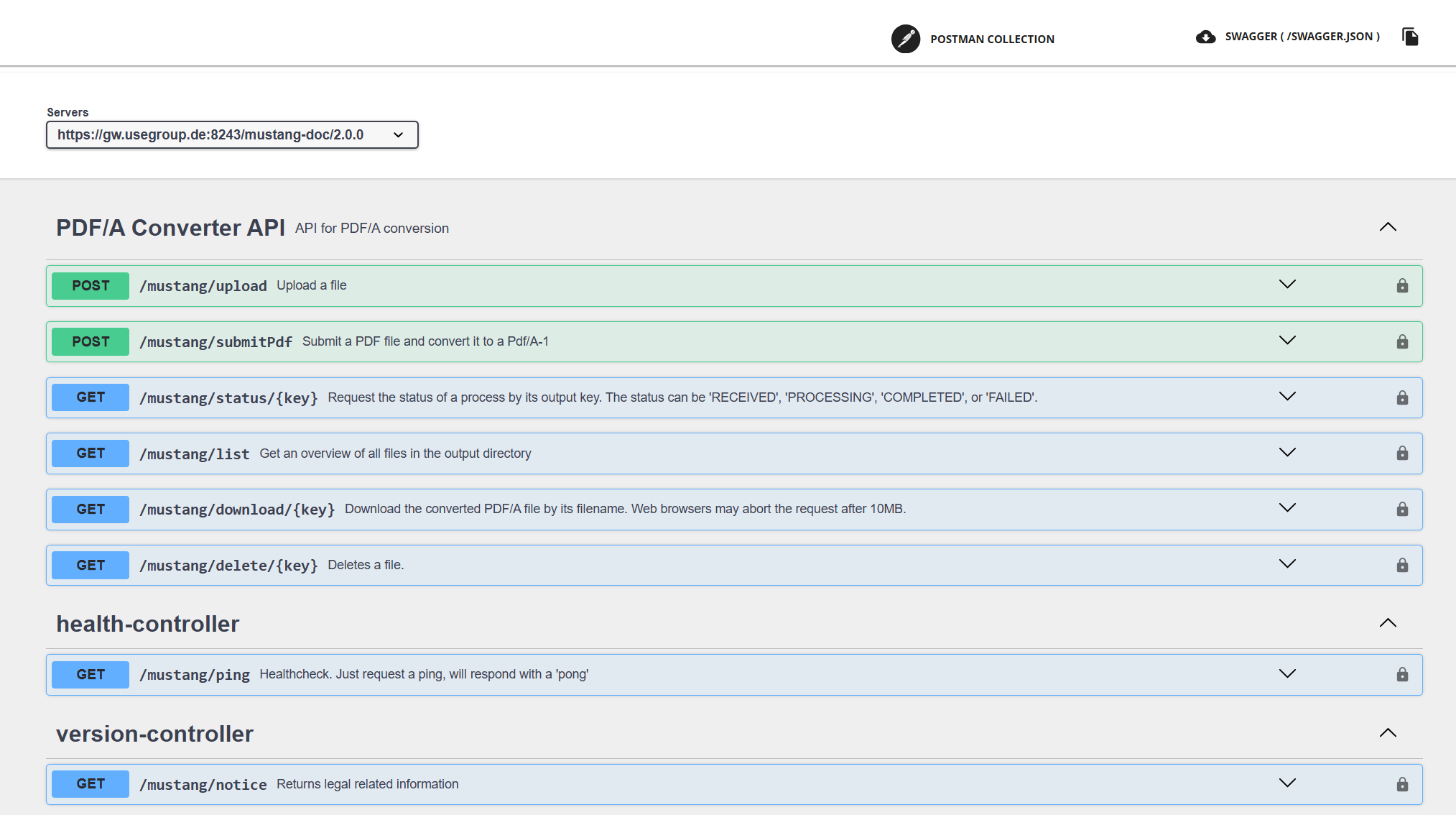
9.4.1. submitPDF
By uploading a Multipart File to submitPDF, specifying the desired PDF/A target version, you can initiate a conversion from PDF to PDF/A.
Parameters
-
file : a multipart file
-
version
-
1: simplest form
-
2: supports among others better image compression
-
3: supports file attachments, vital for Factur-X
-
4: not yet available
-
Return
JSON-Structure with the key of the uploaded file, and the key of the downloaded file to be generated, e.g.
{"inputKey":"3ddf0de1-e7db-4909-acbc-1180ac7e6850" ,"outputKey":"27a72345-d3dd-47c5-917e-55ec852a6000"}9.4.2. status
The output key from submitPDF can be used as key parameter in /mustang/status/{key}, the result will be an array of output keys and their status. A status is available for 24h and can be RECEIVED, i.e. waiting, IN_PROGRESS, DONE or FAILED.
Example return
{"27a72345-d3dd-47c5-917e-55ec852a6000":{"status":"DONE"}}9.4.3. download/{key}
After a status is done the output key can be downloaded using /mustang/download/{key} Please use libraries, Bruno or similar if the download exceeds 10MB as some browser may cancel their connection if more data is returned.
9.4.4. delete/{key}
After download, feel free to /mustang/delete/{key} the file. Unless you use a customized S3 bucket all files will be cleaned up, i.e. deleted, after 24h anyway and total space quota per customer is 1GB.
9.4.5. list
using /mustang/list you can receive a list of keys (i.e. files) for your tenant in your bucket, e.g.
{
  "result": [
    "27a72345-d3dd-47c5-917e-55ec852a6000",
    "3ddf0de1-e7db-4909-acbc-1180ac7e6850"
  ]
}
This list does not distinguish between source or result files.
9.4.6. ping
Just a health check, will return the string pong
9.4.7. General information on S3 connectivity
Configure
You can provide your own bucket by logging in on https://mustangserver.com/settings/ with your API credentials.
Naming conventions
Mustangserver uses <Tenantname>/<guid> as keys for the objects. Tenantname is usually your Mustangserver username.
In case you use a standalone version the Tenantname will match the username header for your requests. In the public offering this username header is overwritten by the API management with the username of the API key or oauth token.
You can use graphical UIs like the open source software Cyberdock to manage the files in your S3 installation.
Procure
You can book S3 space at any provider (for as little as 60ct/GB/10yr). If the provider is not AWS, you wull just have to put the endpoint in the URL field.
Provide
You can also arrange access to your own (onsite) S3 server, e.g. using the open source MinIO server. Open firewall ports 9000 and 9001. In case of virtualization (e.g. Proxmox) make sure the neccessary CPU features are available, e.g. by using cpu type "host".
sudo apt install podman
podman run -e MINIO_ROOT_PASSWORD='<root pwd>' -e MINIO_ROOT_USER='admin'  -p 9000:9000 -p 9001:9001   quay.io/minio/minio server /data --console-address ":9001" -d
enter web ui and create bucket, e.g. abucket
   curl https://dl.min.io/client/mc/release/linux-amd64/mc   --create-dirs   -o $HOME/minio-binaries/mc
chmod +x $HOME/minio-binaries/mc
export PATH=$PATH:$HOME/minio-binaries/
You can then add a user
./minio-binaries/mc alias set local http://<servername>:9000 admin '<password>'
./minio-binaries/mc admin user add local <clientid> <secret>
and grant this user read/write privileges on the bucket
./minio-binaries/mc admin policy attach local readwrite --user <clientid>
./minio-binaries/mc admin user info local <clientid>
Afterwards the configuration via mustangserver.com/settings/ is straightforward.
Please only note that despite a "region" field is not needed by MinIO, it is required by the library used so feel free to put an arbitrary value.
bucket: abucket
region: arbitrary (it may just not be blank)
url http://<servername>:9000/
client id:
client secret:
9.5. Valitool (/valitool), extra subscription
/valitool has a ping enpoint
9.5.1. hybriddoc
Requires a XML or Factur-X file (parameter name „file“) and returns a XML valitool validation report
Kapitel 10. Clients
Apart from the OpenAPI Generator (which is e.g. used for our xref: C#/.net tutorial), Swagger editor used to offer the generation of clients, but this functionality has now apparently been moved to it’s docker image.
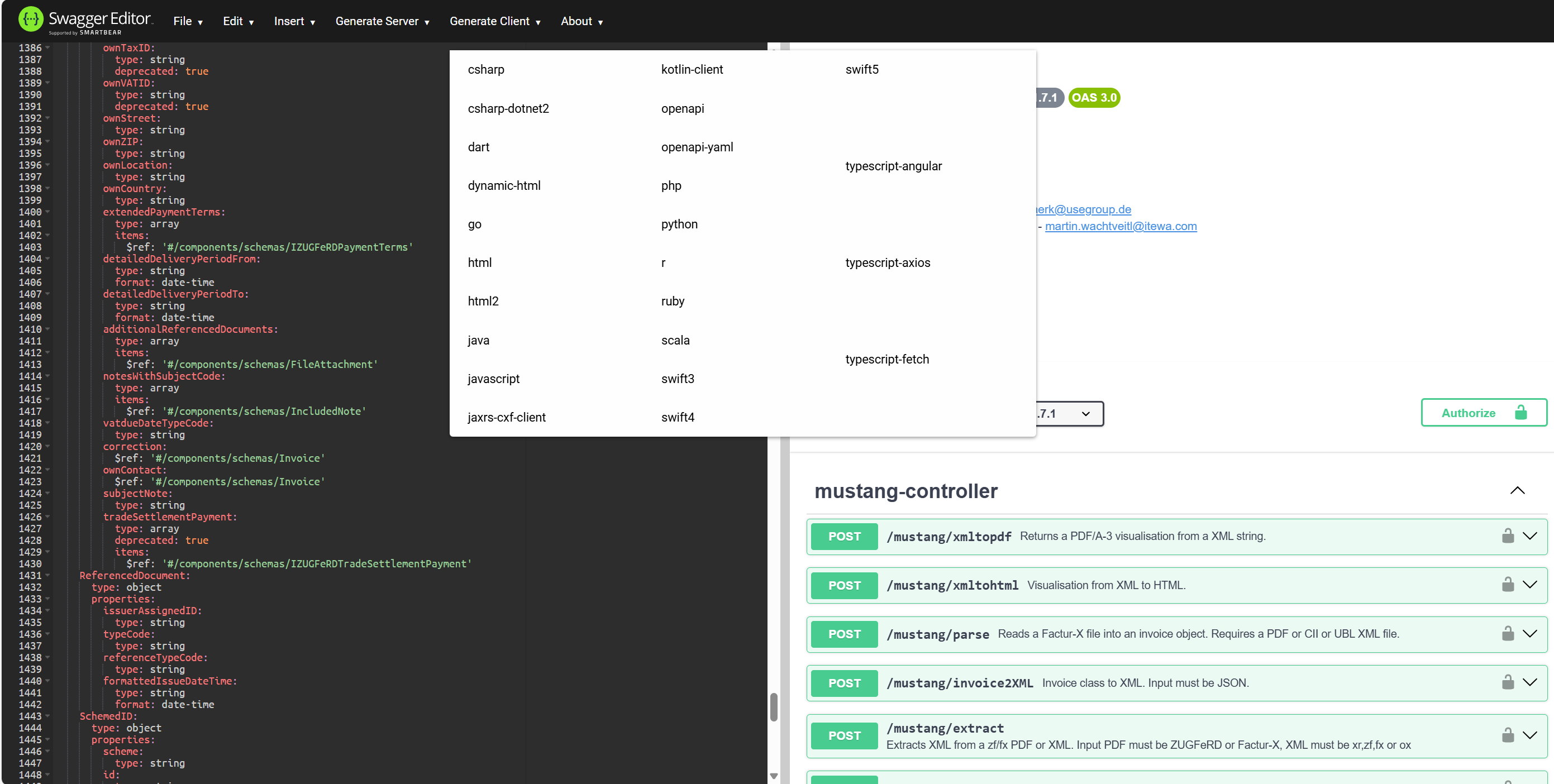
All generated clients require testing and customization, e.g. as regards oAuth authentication, e.g. see our PHP tutorial. We don’t guarantee support for all of them, some of them are likely to not work at all, but these are the most important swagger-editor-docker generated Mustangserver clients:
Kapitel 11. Tutorials
On our website we elaborated how precisely to e.g. create a
-
PHP client, a
-
C#/.net client or
-
Javascript / Node.js / Node Red clients
Kapitel 12. Interactive testing using Postman/Bruno
Bruno is an open source alternative to Postman, graphical user interfaces to create/execute requests on REST APIs.
This example is based on Postman, you will need enabled client credentials as described in the PHP tutorial.
Use Import|File|Upload Files to upload you Openapi.yaml file into a Mustangserver collection.
Add a request to https://gw.usegroup.de:9443/oauth2/token?grant_type=client_credentials and call it Token Request. Postman will auto-detect the Parameter in the URL. Change the type to POST.
In Headers, add a new field Content-Type with application/json as its value.
The tab Authorization should be Basic auth with your client id and secret as username and password. Once you click Send, an according access token should be submitted:
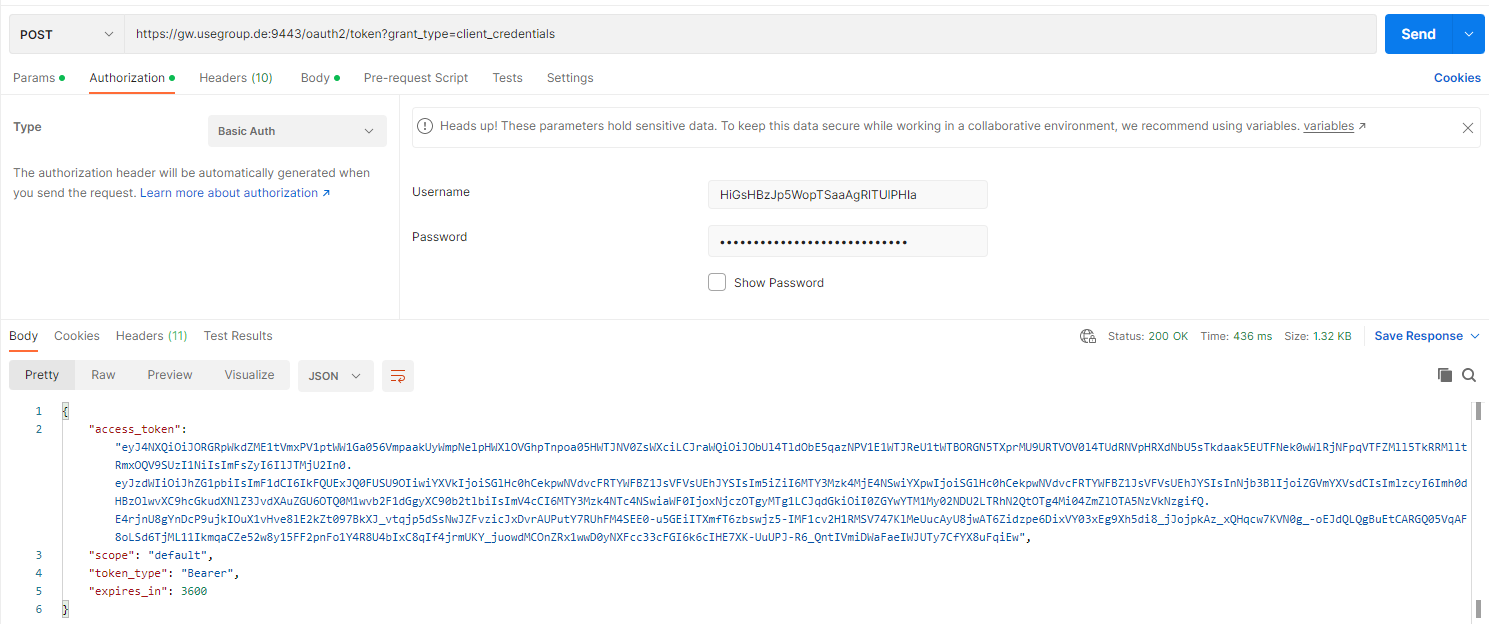
var jsonData = JSON.parse(responseBody);

pm.collectionVariables.set("token", jsonData.access_token);

console.log(jsonData.access_token);
In the „Tests“ tab and View|Show Postman Console (Alt+CTRL+C) . Once you click Send again you should be able to see the access token also in the Console:

 In the collection, click on the variables tab and add „token“ as a
collection variable.
In the collection, click on the variables tab and add „token“ as a
collection variable.
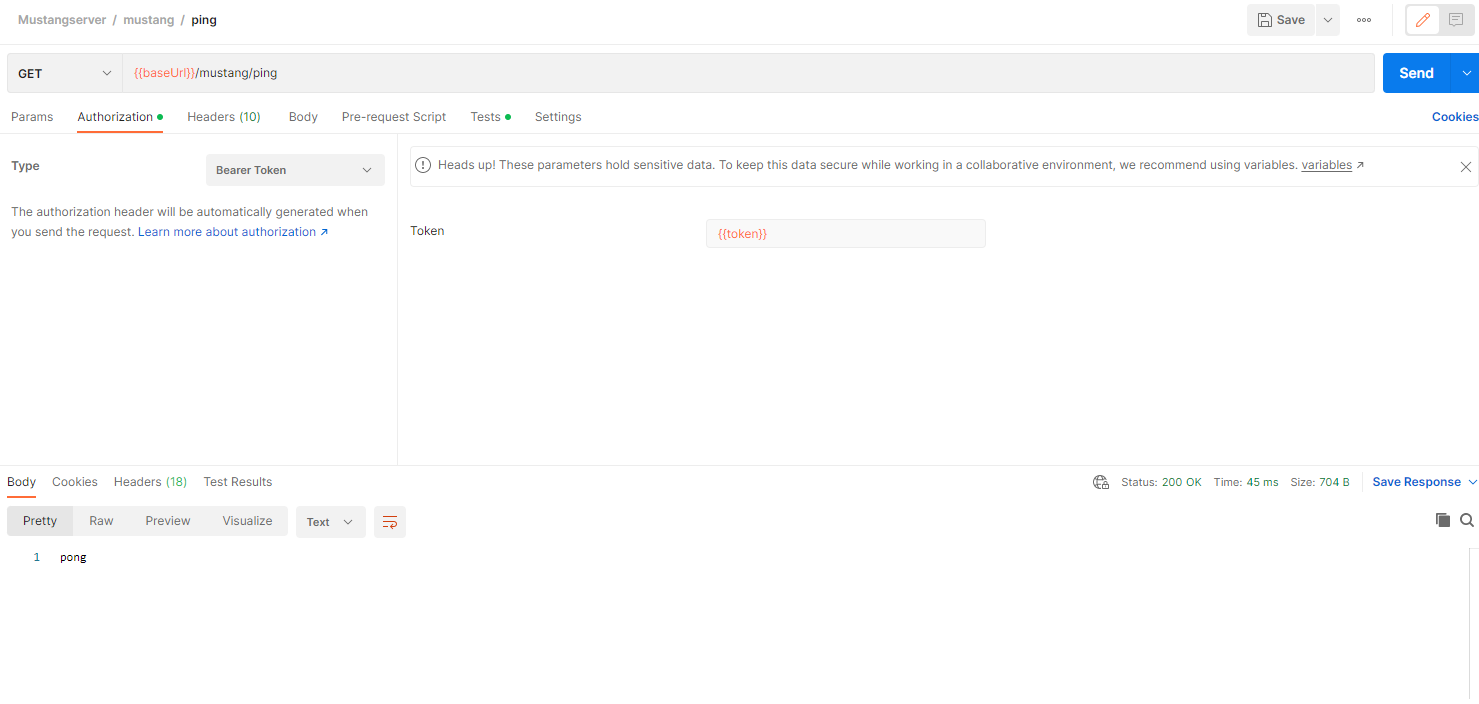
You can now add the variable {{token}} as authorization to any request. The variable will be available and the requests work after you click on „Send“ of the Token Request for the first time.
Please note that ping was answered by pong.
Where appropriate, e.g. in the validation endpoint, Postman will allow you to select files, this being a valid factur-x:

Kapitel 13. Performance Tests with Jmeter
Jmeter is a generic load testing tool and load generator.
If you want to perform load tests, in order not to affect our production servers, we will happily grant you access to our mirror infrastructure, i.e. we will guarantee that the hardware, software and settings are identical.
https://openapi-generator.tech/ supports a Jmeter export but that does not handle authentication so here we describe how to set up some Jmeter performance test manually.
For this example, you will need enabled client credentials as described in the PHP tutorial.
Right click your Test plan, add a Thread Group with a Once Only controller. Below that, add a HTTP request sampler, we’ll call it Token Request. This is how it is defined: Change protocol to https, method to POST, add server name and port number, and add the path:
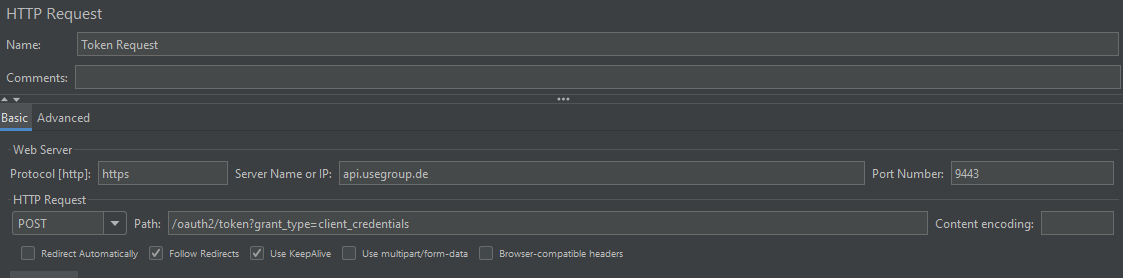
Base64encode
your <consumer key>:<consumer secret> as described on the applications
page of the API management:
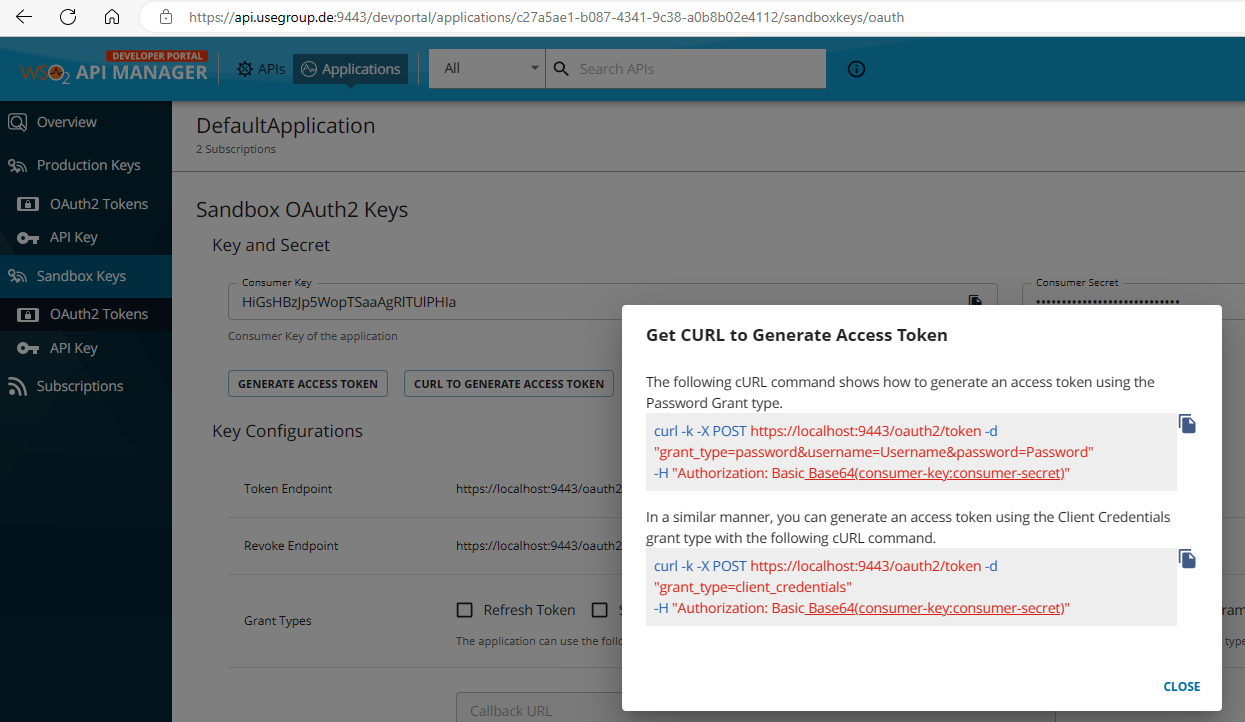
In Jmeter, below the Token request, add a HeaderManager with Basic Authorization as described:
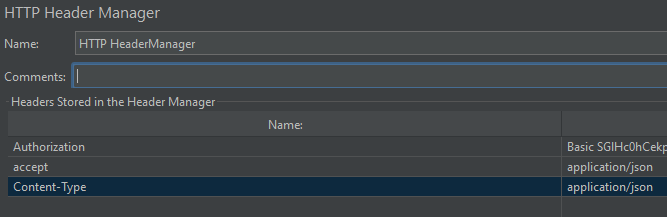
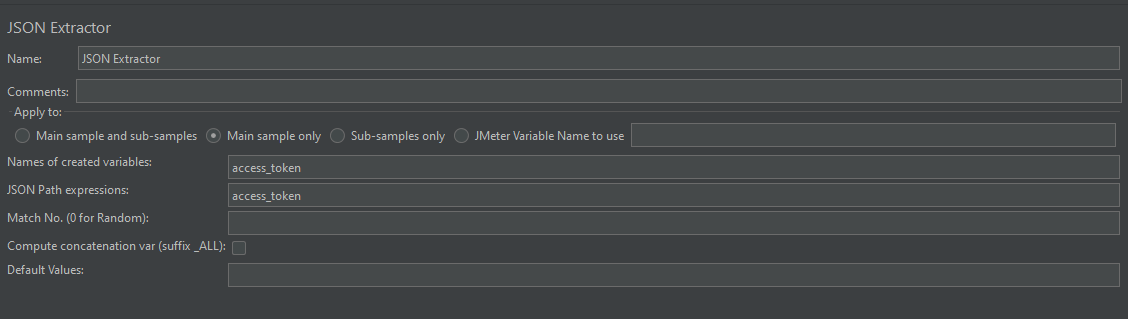
And from the response, also below Token Request, extract the JSON value access token into a Jmeter Variable access token using a JSON Extractor:
Add a sampler View Result Tree to confirm the results and a debug sampler if you like (in the results tree you will then be able to e.g. see the current variables when you click on the results of the debug sampler).
Run|Start should give you green entries in the results tree.
Now we will set the ordinary authentication as header: add another Header Manager outside of the Token request and add the variable as token, i.e. Authorization being Bearer ${access_token}

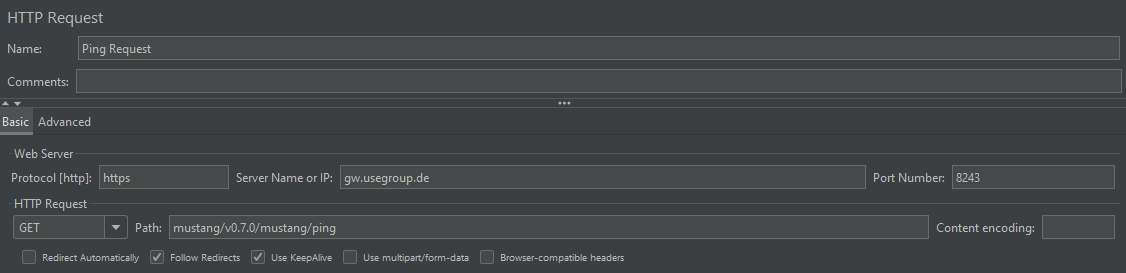
You can then add a simple ping request in the thread group
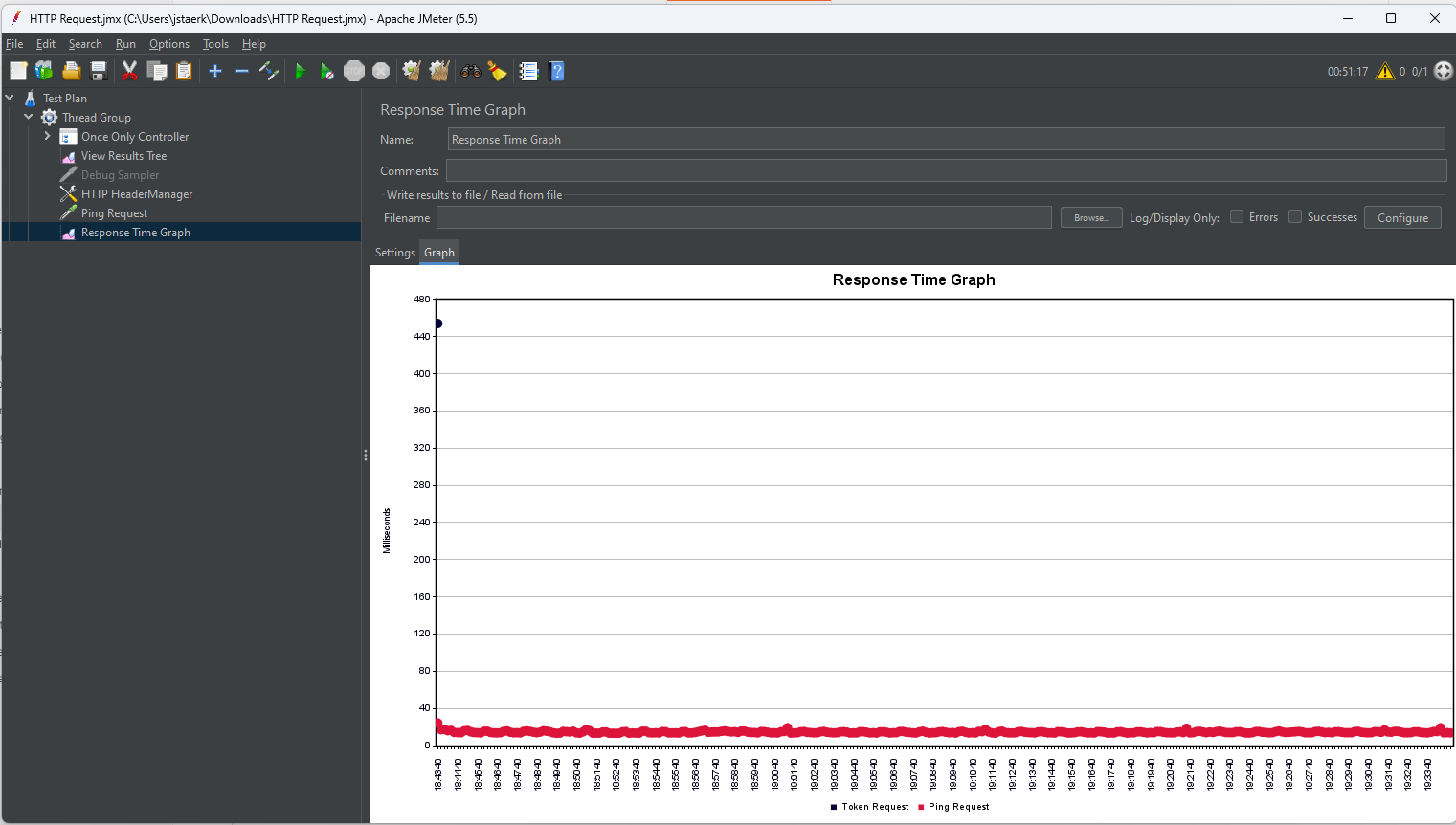
and e.g. a Response time graph.You can then set the Thread group loop count to infinite, start the sampling and check the results tree.
After a while the response time graph will look like this, indicating the initial login took ~440ms and the usual response time to our „ping“ is ~20ms.
Kapitel 14. Terms of service
14.1. Evaluation terms
To test and evaluate the service a valid email address has to be provided. Unless otherwise agreed (info@usegroup.de) test access is restricted to one account per legal entity, i.e. usually company. This email address will also be used to send availability, information about the roadmap, development and status with an expected maximum volume of one per week. You can terminate your test phase by unsubscribing from the announcements newsletter list. After the signup, access can then happen free of charge, with a limit of 1,000 operations/month, unless access is revoked by usegroup. You are not allowed to share personal data (e.g. real invoice recipient’s names, addresses, email addresses, bank credentials or real invoice contents). Access may be revoked because the general test phase has ended, the test phase is over for a certain customer, or due to other terms which do not need to be disclosed. Under this test terms we also do not guarantee the availability nor the correctness of the service.
14.2. Production terms
To access Mustangserver productively including a data processing agreement a Mustang Pro license is required. Further info can be obtained at https://www.mustangproject.org/pro/
Kapitel 15. Troubleshooting
-
The ping endpoint is intentionally simple and can be used to check basic functionality
-
A HTTP reponse code 400 Post method not allowed on methods which do allow post may (temporarily) indicate a throttled user or subscription
Kapitel 16. Inhouse variant
16.1. (optional) Set up Sentry
Sentry is an optional centralized Exception Tracking System Mustangserver can send exceptions to. It requires 40gb HDD, 16gb RAM and at least 4 CPUs
16.1.1. Install docker
sudo apt install curl git

sudo su
curl -sSL https://get.docker.com/ | CHANNEL=stable sh
# After the installation process is finished, you may need to enable the service and make sure it is started (e.g. CentOS 7)
systemctl enable docker.service
systemctl start docker.service

curl -L https://github.com/docker/compose/releases/download/$(curl -Ls https://www.servercow.de/docker-compose/latest.php)/docker-compose-$(uname -s)-$(uname -m) > /usr/local/bin/docker-compose
chmod +x /usr/local/bin/docker-compose
16.1.2. Config
VERSION=$(curl -Ls -o /dev/null -w %{url_effective} https://github.com/getsentry/self-hosted/releases/latest)
VERSION=${VERSION##*/}
git clone https://github.com/getsentry/self-hosted.git
cd self-hosted
git checkout ${VERSION}
./install.sh
Adjust sentry/config.yml
system.url-prefix: 'https://sentry.usegroup.de'edit sentry/sentry.conf.py, remove comments in front of ssl lines 255-258.
adjust settings for Mail Server ~l 90
mail.host: 'mail.usegroup.de'
mail.port: 587
mail.username: 'info@usegroup.de'
mail.from: 'info@usegroup.de'
mail.password: '<password/>'
mail.use-ssl: false
16.2. Run from Jar/War
java -jar mustangserver.war --spring.profiles.active=local
-Dspring.profiles.active=local
Sentry will be used if at least an environment variable SENTRY_AUTH_TOKEN= is set and the default Sentry DSN can be overwritten if additionally a environment variable SENTRY_DSN is set.
16.3. Run from Docker
If you bought the inhouse version: the container registry is dev.usegroup.de:5050 and the default port the server starts on is 8000
docker login dev.usegroup.de:5050 -u <username> -p <token>
docker run --name Mustangserver -e MUSTANG_SERVER_VERSION=1.7.2 -dp 8000:8000 dev.usegroup.de:5050/internal/mustangserver:1.7.2
Afterwards you should be able to access
and e.g. perform a ping like described above. You can leave username empty. The correct response to ping is „pong“.
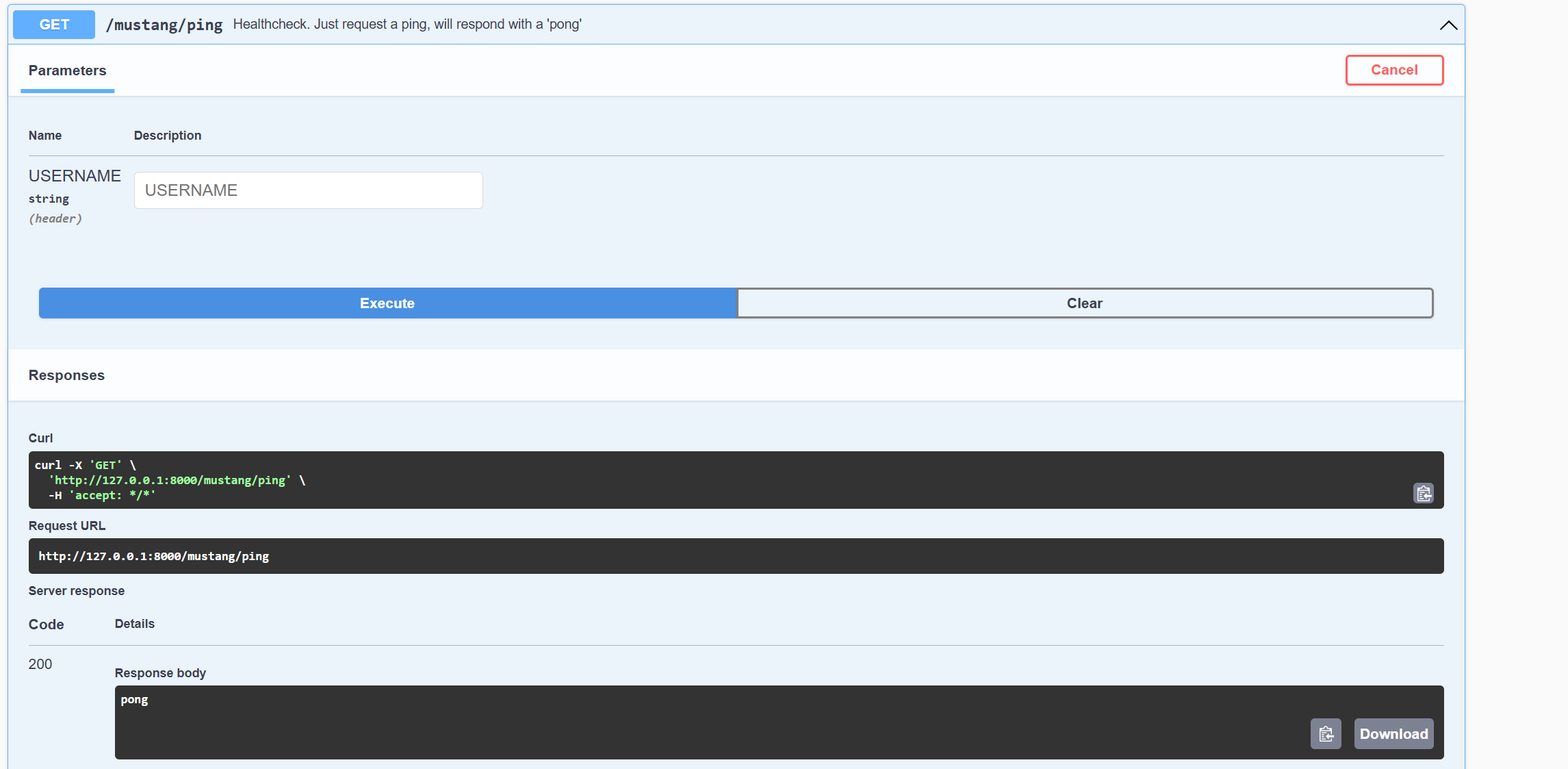
By specifying additional -e key=value pairs (e.g.
docker run --name Mustangserver -e MUSTANG_SERVER_VERSION=1.7.2 -e mustang.allowedIPs=123.45.67.89 -p 8888:8000 dev.usegroup.de:5050/internal/mustangserver:1.7.2) you can
set config variables.
Available variables are
| Config | Default | Description |
|---|---|---|
server.port |
8000 |
The port the OpenAPI HTML Client and backend operate on |
mustang.allowedIPs |
If specified, a comma-separated list of IPs who will be allowed to connect |
|
mustang.oAuth |
false |
Off by default |
mustang.additionalLog |
Additional entries for the log line of the request, can e.g. be set to the instance’s ID to allow a consolidated. Logs are stored in /opt/mustangserver/log and in a future version there may be a filebeat to be configured |
|
keycloak.enabled |
false |
Almost never to be set to true, even if you connect to a keycloak server, if true it will start an keycloak server on its own |
openapi.server-url |
localhost |
Endpoint URL published via swagger file |
spring.security.oauth2.client.registration.keycloak.client-id |
login-app |
Oauth2 specific setting (if enabled) |
spring.security.oauth2.client.registration.keycloak.authorization-grant-type |
authorization_code |
Oauth2 specific setting (if enabled) |
spring.security.oauth2.client.registration.keycloak.scope |
openid |
Oauth2 specific setting (if enabled) |
spring.security.oauth2.client.provider.keycloak.issuer-uri |
Oauth2 specific setting (if enabled) |
|
spring.security.oauth2.client.provider.keycloak.user-name-attribute |
preferred_username |
Oauth2 specific setting (if enabled) |
spring.security.oauth2.resourceserver.jwt.issuer-uri |
Oauth2 specific setting (if enabled) |
|
message-from-application-properties |
Die Anwendung wird in der Default Environment gestartet! |
Will just be shown on the console |
server.servlet.context-path |
Usually not set at all but could be set to e.g. /api/v1 |
|
springdoc.api-docs.path |
/api-docs |
Where the openapi spec file will be found |
springdoc.swagger-ui.path |
/swagger-ui |
Path of the HTML GUI |
logging.config |
classpath:logback-spring.xml |
Kapitel 17. Sentry
You can setup to use a inhouse (or central) „Sentry“ Exception Tracking Server ,
Kapitel 18. Version history
Of this document:
0.7.0 on 2023-01-19 by Jochen.
0.8.0 on 2023-02-25 by Jochen: Added Mustangserver 0.8.0 (=Order-X)
0.8.1 on 2023-02-26 by Jochen: added C++-Client, PDF/A-param to PDF endpoint
1.0.0 on 2023-09-26 by Jochen: most recent endpoint, neccessity to subscribe, split between mustangserver and mustangserver-docs, updated list of Ves-IDs, added change password url
1.1.0 added username field, exception handling, invoice2XML parameter standard was renamed to format. Better Exception handling. CombineXML now also allows PDF/A-3 input.
1.2.0 on 2024-01-31 /combineXML /parse and /invoice2XML now support XRechnung 3.0.1
1.3.0 on 2024-02-29 Endpoint /combine is now available again (combine JSON and PDF to fx), /phive has been updated, now auto-detects Ves-IDs if none specified and now also supports e.g. XR 3.0.1 (from 135 to 143 VesIDs). /xmltohtml and API keys documented. Mentioned Bruno.
1.3.1 on 2024-07-29 JSON structure documented, added Troubleshooting
1.4.0 added description of detach and xmltopdf endpoint and of C# sample client. Added section classes.
1.4.1 added chapter on Docker config for in-house server. Corrected timezone in example. Added BT Mapping and invoice class description.
1.4.2 Added paragraph on most recent versions and API keys, added examples for §19 UStG small businesses and intra-community supply. Added documentation for corrected invoices, cancellations and credit notes.
1.5.0 New in the server (2024-11-20) were improved UBL import, improved JSON return after parse (without empty elements), docker without SecurityAutoConfiguration and the valitool endpoint (not yet documented)
1.5.1 (2024-11-30) BankDetails and IncludedNotes work in the server, possibility to specify server address to be included in OpenAPI
1.6.0 (2024-12-30) File attachments work in the server, documented valitool and PDF, added and documented ignoreNotices parameter to validation. New UBL2CII/CII2UBL endpoints. Javascript example client documented. Added description of eeisi/eigor, file attachments and includednotes.
1.7.0 (2025-08-20) Outsourced the list of PHIVE VES-Ids and the tutorials, added Sentry config, migrated to Asciidoc, added the comprehensive example and swagger editor generated clients.
1.7.1 (2025-10-08) updated BT mapping table, added Mustang-Ghostscript
Index
Glossar
- ZUGFeRD
-
Zentrale User Guides Forum elektronische Rechnung Deutschland